Chat
Coworkee.Chat adds direct and group chats between the people of an organisation: formatted messages, mentions of people and records, replies, reactions, files and pictures, edits and deletes, read marks and who is writing. Everything reaches the members over the realtime hub on their user:{id} topic, so every open tab updates at once.
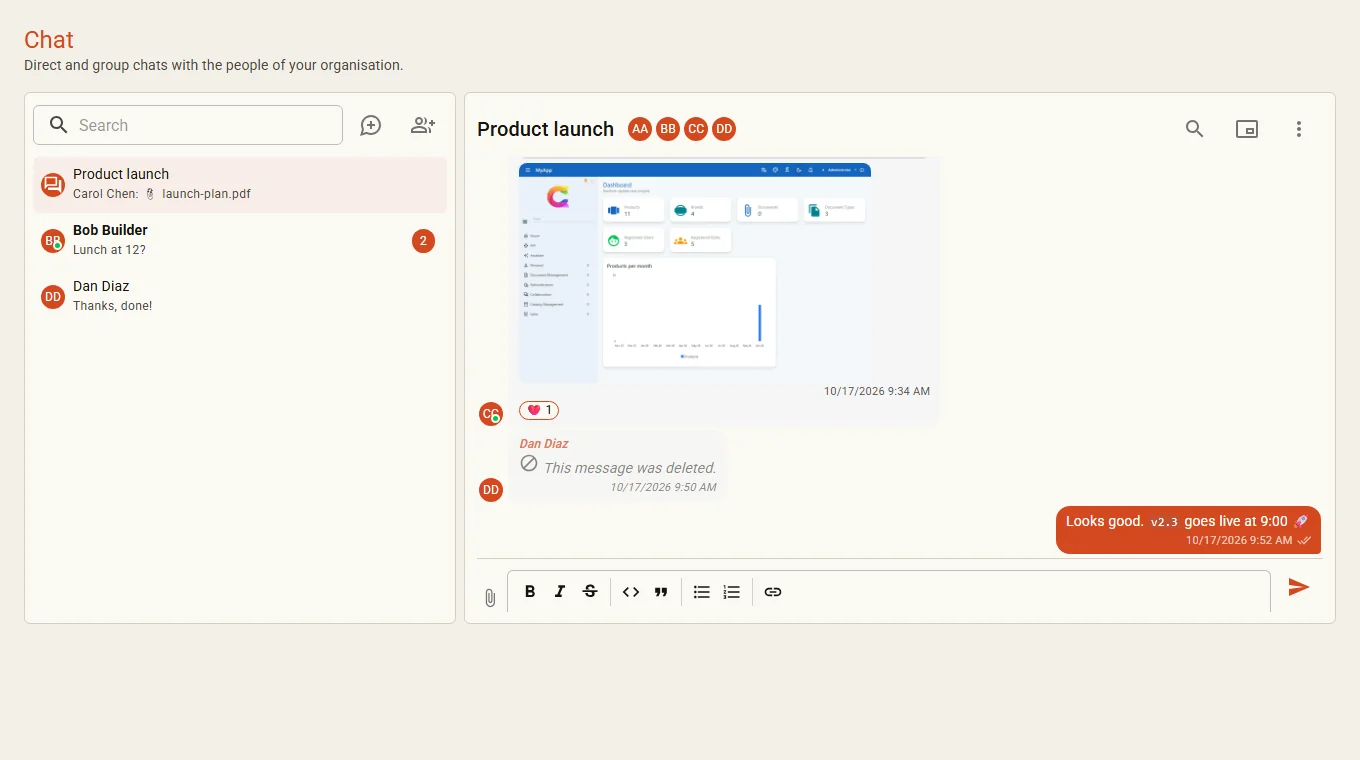
The module depends on the identity, realtime and storage modules (files go to the blob storage). Mentions notify through the notifications module (see Realtime and notifications) when the app has it.
Writing
- The composer is the library's
RichTextEditor(TipTap or Quill, as the admin chose in the setting Rich text editor, see Mailing) with a short toolbar: bold, italic, strike, code, quote, lists, link. TipTap also takes markdown shortcuts while typing (**bold**,*italic*,-list,>quote,`code). - Enter sends, Shift+Enter breaks the line. While a mention list is open, Enter picks the entry.
@suggests the people of the organisation. A mention is a link to the person's page (/people/{id}, library page keyperson) and always shows the person's current name.#suggests records from the global search (every provider the writer may use, except chats). The mention links to the record's page. Each reader sees it only when his own search finds the record; otherwise it shows as #restricted with a lock, without label or link. Sending a mention of a record the writer cannot see is refused.- Files: the clip button, drag and drop onto the composer, or pasting a picture. Uploads show their progress and open in the file viewer once they are up. Pictures show inline as a small WebP the server makes (
/thumbnail, at most 480 px, turned upright), other files as a chip; a click opens the file inMudExFileDisplay(see Showing files). Only members of the chat load them (GET /api/v1/chat/attachments/{id}), served like the files module (no sniffing, sandboxed inline). Files uploaded but never sent are deleted afterCoworkee:Chat:UnsentAttachmentLifetime(default1.00:00:00, a job checks every hour). - Reply, react (👍 ❤️ 😂 🎉 😮 😢, click a reaction to add or take back your own), edit and delete are in the menu of each message. Only the sender edits or deletes; an edited message shows edited, a deleted one This message was deleted. and loses its files and reactions.
- The check marks under an own message show who read it (tooltip with the names).
- Search in a chat with the magnifier: messages containing every word.
The server sanitizes every message: only formatting, lists, quotes, code and links (http, https, mailto, opened in a new tab) remain; scripts, styles, pictures and event attributes go. Mentions are stored in one canonical form and rendered for each reader.
Group chats
New group asks for a name and the people. Every member renames the group and adds people; the creator (owner) removes others; everyone can leave. A direct chat exists once per pair and keeps its two people.
Mini chats
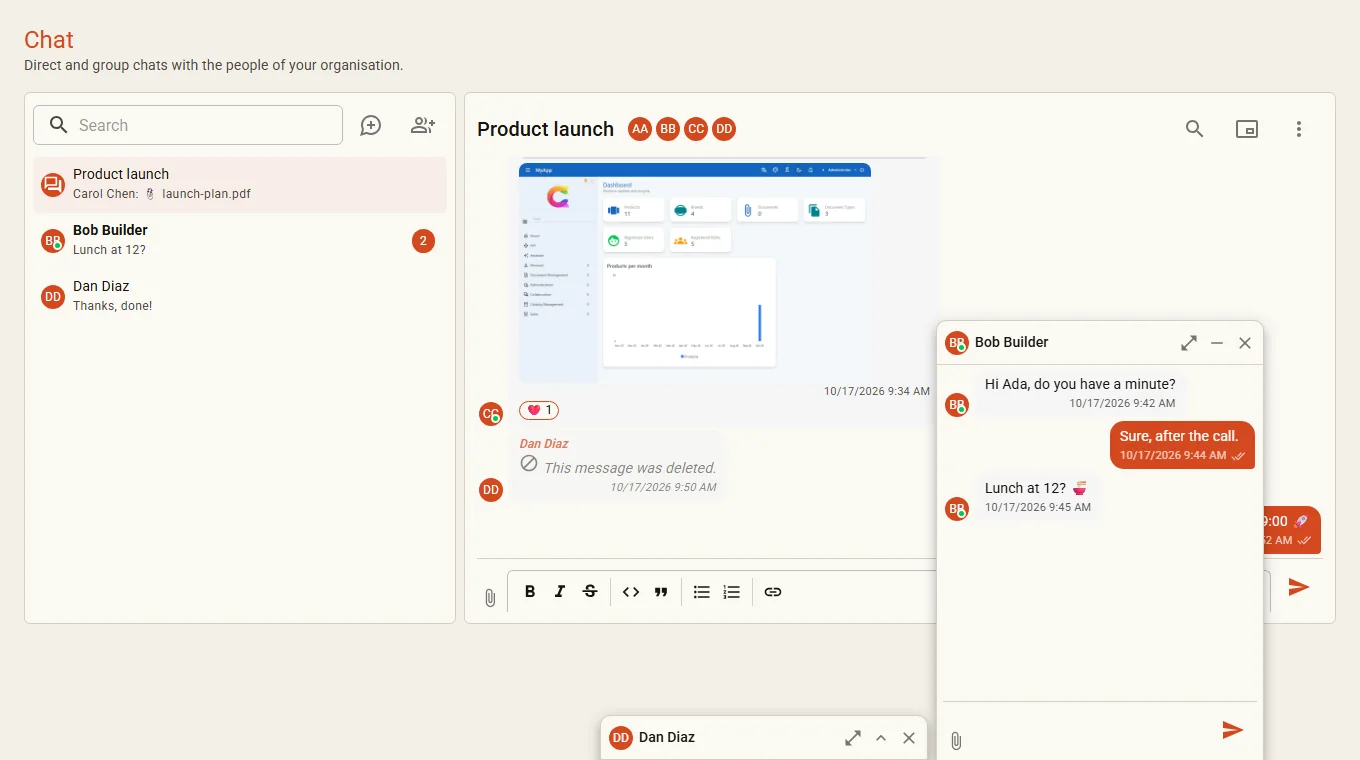
Chats also open as mini chats in a dock at the bottom right, left of the assistant button, up to three at once:
- the header minimizes a window to its bar (with the number of new messages), Open in the chat moves it to the chat page, the cross closes it;
- the open windows are kept per user in the browser and come back after a reload;
- on a phone an open mini chat fills the screen.
Ways to open one: Open as mini chat on the chat page, the command palette (Chat with… picks a person; @name lists matching people directly), a click on any avatar of another person (Chat or Profile), the Chat button on the person page, the snackbar of a new message and a mention notification. Without the dock on screen (an own layout) these go to the chat page instead.
ChatDock (scoped) opens chats from your own components:
@inject ChatDock Dock
<MudButton OnClick="() => Dock.OpenWithAsync(customer.ContactUserId)">Chat</MudButton>
Mentions and notifications
A mention notifies only members of the chat (type chat.mention, link /chat?c={id}, which opens the mini chat). Mentioning someone outside the chat links to the person but sends nothing: the person could not read the message anyway. New messages without a mention show a snackbar in the app (no persistent notification).
Settings and hooks
| Setting | |
|---|---|
Chat.MaxAttachmentMb |
largest file in MB, default 25 (Global, visible to the client, which checks before uploading) |
A virus scanner or other check plugs in as IChatAttachmentScanner; any scanner that says no rejects the upload:
API
| Endpoint | |
|---|---|
GET /api/v1/chat/chats |
the user's chats, newest first, with members, last message and unread count |
POST /api/v1/chat/chats |
create a group { "name", "memberIds" } |
POST /api/v1/chat/chats/direct/{userId} |
open the direct chat with a person (created on first use) |
GET /api/v1/chat/chats/{id} |
one chat |
PUT /api/v1/chat/chats/{id}/name |
rename a group |
POST /api/v1/chat/chats/{id}/members · DELETE …/members/{userId} |
add people · remove or leave |
GET /api/v1/chat/chats/{id}/messages?before=&search= |
50 messages, newest last |
POST /api/v1/chat/chats/{id}/messages |
send { "html", "replyToId", "attachmentIds" } |
POST /api/v1/chat/chats/{id}/attachments?name= |
upload a file (body = file, Content-Type = its type), then send its id |
POST /api/v1/chat/chats/{id}/read · …/typing |
mark read · tell the others you are writing |
GET · PUT · DELETE /api/v1/chat/messages/{id} |
read (rendered for the reader) · edit · delete |
POST /api/v1/chat/messages/{id}/reactions |
add or take back { "emoji" } |
GET /api/v1/chat/attachments/{id}?download= |
a file, members only |
GET /api/v1/chat/attachments/{id}/thumbnail |
the small WebP of a picture (hasThumbnail of the attachment), members only |
GET /api/v1/chat/unread-count |
unread messages of all chats |
GET /api/v1/chat/contacts, GET/POST /api/v1/chat/conversations/{userId}, POST …/{userId}/read |
the plain text direct chat API by person (AirWorks chat app, assistant) |
ChatMessageDto.Html is safe HTML to show; Text is plain text (record mentions only as #), used for previews, notifications and the search. The assistant can list chats, read and send messages (AI tools).
Live events
Type on user:{id} |
Payload |
|---|---|
chat.message |
ChatMessageDto: new, edited, deleted or reacted. Records are not resolved in it (HasEntityMentions): load the message to see them with the reader's rights. |
chat.read |
ChatReadDto with ConversationId |
chat.typing |
ChatTypingDto |
chat.conversation |
ChatConversationDto after name or member changes |
await realtime.SubscribeAsync(RealtimeTopics.User(me), envelope =>
{
    if (envelope.Type == ChatEvents.Message) { /* envelope.Payload is a ChatMessageDto */ }
});
Upgrading
Since the thumbnails, apps need a migration for the column cw.ChatAttachments.ThumbnailKey; pictures sent before keep showing the full file in the list.
Apps need a migration (cw.ChatConversations, cw.ChatMembers, cw.ChatReactions, cw.ChatAttachments, new columns of cw.ChatMessages). Direct messages from before move into conversations at the next start (ChatLegacyMessages); what the recipient had read stays read.