Permissions
Permissions are strings, defined by the modules, granted to roles, groups or single users, and checked on the server and in the UI.
Defining
internal sealed class CatalogPermissionDefinitions : IPermissionDefinitionContributor
{
    public void Define(PermissionDefinitionContext context) =>
        context.Group(CatalogPermissions.GroupName, "Catalog")
            .Add(CatalogPermissions.Products.View, "View products")
            .Add(CatalogPermissions.Products.Edit, "Edit products", CatalogPermissions.Products.View);
}

services.AddSingleton<IPermissionDefinitionContributor, CatalogPermissionDefinitions>();
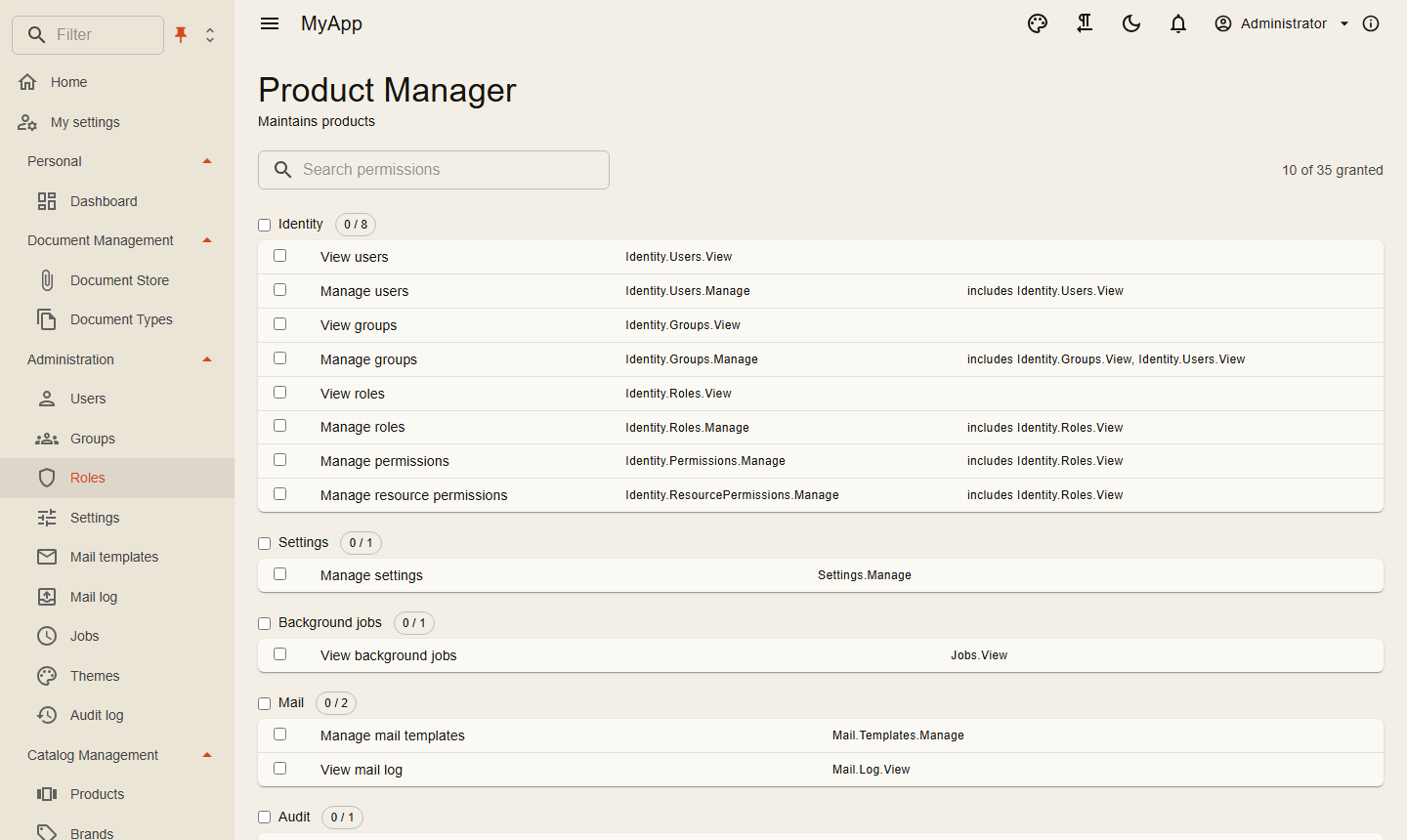
The definitions build the permission matrix in the role editor: grouped, searchable, with counts and a toggle per group.
Checking on the server
| Where | How |
|---|---|
| A request | [RequiresPermission(CatalogPermissions.Products.Delete)] on the request type |
| Inside a handler | await permissions.IsGrantedAsync(CatalogPermissions.Products.Edit, ct) with IPermissionChecker |
| A single resource | await permissions.IsGrantedAsync(permission, "Folder", folderId, ct) |
| An endpoint group | .RequireAuthorization() plus the request attribute |
| An OData set | the permission passed to AddODataEntity |
Resource grants inherit along a hierarchy you describe with IResourceHierarchy (folders in folders, for example). IResourceRestriction takes access away again for certain roles, even from holders of a global grant.
Computed permissions
Some rights follow from data, not from a role: "leads at least one person", "owns a project". A computed permission grants a defined permission whenever its check answers true:
services.AddComputedPermission(HrPermissions.LeadsPeople, (c, ct) =>
    c.Granted.Contains(HrPermissions.Manage)
        ? Task.FromResult(true)
        : c.Services.GetRequiredService<HrDbContext>().Employees.AnyAsync(e => e.LeaderUserId == c.UserId, ct));
Or a class implementing IComputedPermission, registered with services.AddScoped<IComputedPermission, LeadsPeople>(). The permission must be defined like any other (it shows in the role editor, so an admin can also grant it to a role) and implies what its definition implies. It is part of the user's effective permissions everywhere: [RequiresPermission], IPermissionChecker, OData sets, MCP tools, the permission list the client loads, and so navigation entries, PermissionGate and policies.
- The checks run after the role grants, once per request and user (the result is kept for the request, not across requests), only for active members, and only for permissions the user does not already hold. A data change shows with the next request; the client sees it when it reloads its permissions (after sign-in or a permission change).
- Keep them to one indexed query each: every authenticated request that checks a permission pays for all computed permissions once.
- Query your tables directly. Calling the permission checker or a command with
[RequiresPermission]from a check recurses. - API keys get a computed permission only within their scopes.
Acting as the system
Sometimes a module has to run a library command whatever the caller may do: the HR module keeps the group of a team in step when a manager edits the team, although the manager may not manage groups. ISystemDispatcher sends such a command as the system:
await system.SendAsync(new SetGroupMembers(groupId, memberIds), [IdentityPermissions.Groups.Manage], ct);
The command runs in the caller's organisation, signed in without a user and with exactly the permissions you name (no roles, nothing more), and in a DI scope of its own, so the caller's pending changes are not saved with it. Its audit entries show system. CurrentUserScope.BeginSystem(tenantId, permissions) does the same without the own scope, e.g. in a background job for another organisation.
Use it only after your own code has decided that the caller may cause the change ([RequiresPermission] on your own command, a check on the record). Never pass on a request the caller built: it would let them do anything the named permissions allow. For work on behalf of a user, act as that user (ImpersonatedUser) instead.
Checking in the UI
@attribute [Authorize(Policy = PermissionPolicy.Prefix + CatalogPermissions.Products.View)]

<PermissionGate Permission="@CatalogPermissions.Products.Create">
    <MudButton OnClick="CreateAsync">New product</MudButton>
</PermissionGate>
PermissionGate renders its content only with the permission; navigation entries and table buttons take a permission parameter and hide themselves. The client loads the effective permissions of the user after sign-in.
The UI only hides. The server decides.
Host-only permissions
Some permissions serve the whole installation: Features.Tenants, Features.Editions and Identity.Clients.Manage (clients and scopes). Every administrator holds them, but only the administrators of the system organisation can use them.
Seeding roles
seed.Roles.Add(new SeedRole("Product Manager", "Maintains products",
    [CatalogPermissions.Products.View, CatalogPermissions.Products.Create, CatalogPermissions.Products.Edit]));
See Persistence.