Reporting
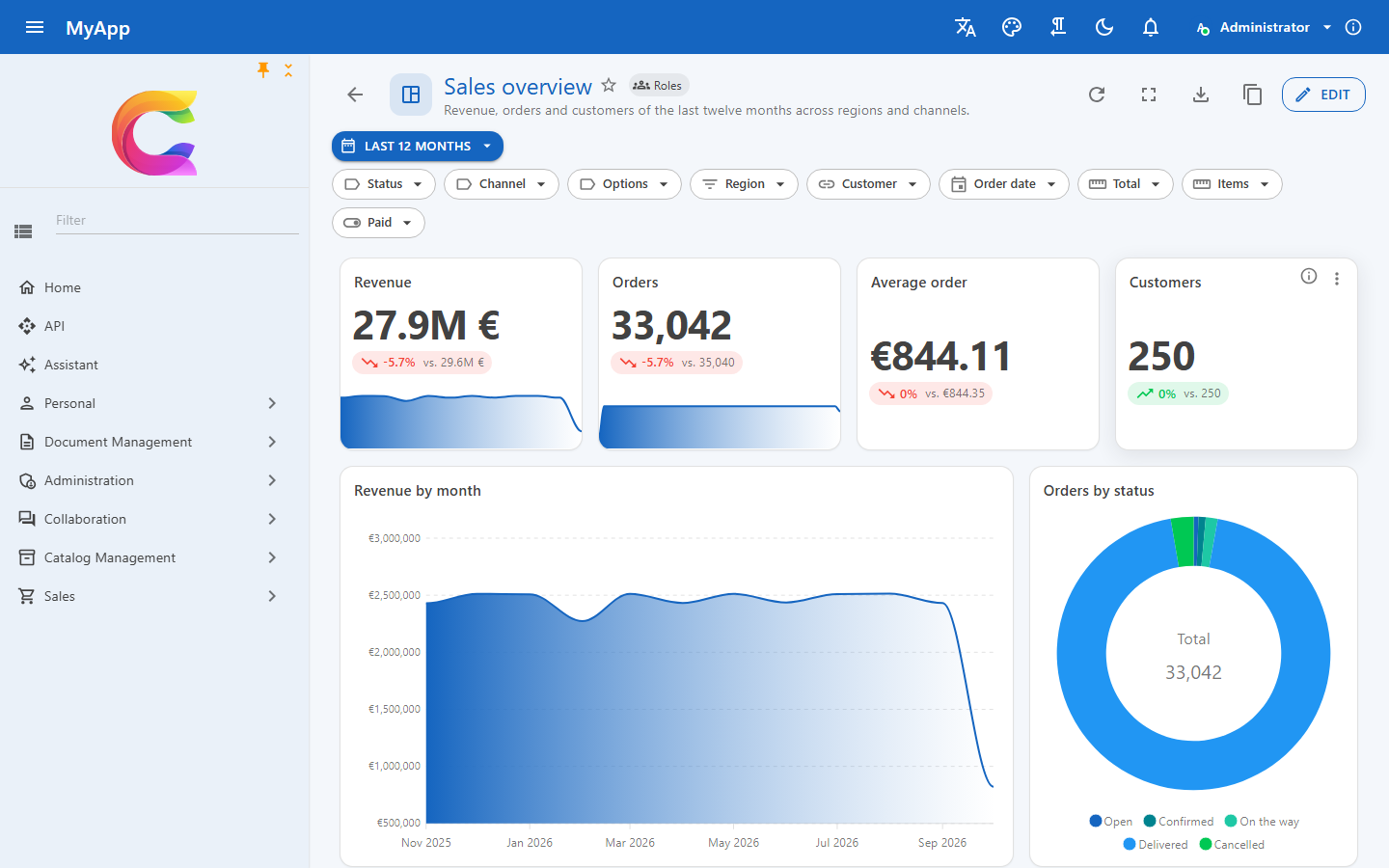
Coworkee.Reporting (server) and Coworkee.Client.Blazor.Reporting (client) add dashboards over the OData entity sets of your app. Users arrange widgets on a grid, filter them together, click a bar to narrow the rest and share the result with roles or the whole organisation. Every number is aggregated by the database, so a dashboard over 100,000 rows answers in a few milliseconds.
Setup
// API: the module brings tables, endpoints, permissions and live updates
[DependsOn(typeof(CoworkeeReportingModule))]
public sealed class MyAppDatabaseModule : CoworkeeModule;
// WebAssembly client: pages under /reports and the "Reports" navigation entry
builder.Services.AddCoworkeeReporting(baseAddress, reports => reports
    .DrillDown("SalesOrders", "sales/orders")      // "Open the data" lands on your page with the widget's filter
    .DrillDown("Products", "catalog/products"));
Add typeof(Coworkee.Client.Blazor.Reporting.ReportingOptions).Assembly to the router's AdditionalAssemblies (in Routes.razor and in AddAdditionalAssemblies of the web host) and create a migration for the tables cw.Reports and cw.ReportFavorites. New apps get all of this with the template option --reports (on by default).
Your entity sets as data sources
Reports use what you already registered for OData, nothing else:
services.AddODataEntity<SalesOrder>("SalesOrders", SalesPermissions.Orders.View);
services.AddODataEntity<Customer>("Customers", SalesPermissions.Orders.View);
- Fields come from the EDM: properties hidden with
AddODataEntity(..., o => o.Secret)never show up, neither as field nor in a filter. - Navigation properties to another registered set add its fields, e.g.
Customer/Name; the user needs the permission of that set too, and its row filters apply: a customer the user may not see counts as empty (null), never under its name. - Labels come from
[ProvideFacet(Label = ...)],[Display(Name = ...)]or the property name; enum members show their[Display]names. - Rows are the ones the OData list returns: tenant filter, soft delete and every
IODataEntityFilter<T>apply. A user without the set's permission gets a 403 for widgets on it, the rest of the report still works. - Entities with
[Realtime]refresh open dashboards when their rows change.
GET /api/v1/reports/sources lists the sets and fields the signed-in user may use.
Own data sources
Some numbers are no rows of one table: headcount per month from hire and exit dates, turnover or sick rate per month, overtime per department, training compliance. Register them as a source with a plain row type; reports list it after the entity sets (marked with a sum icon) and aggregate its rows like those of a set:
public sealed record HeadcountRow(
    DateOnly Month,
    string Department,
    [property: DisplayName("Employees")] int Headcount,
    int Hires,
    int Exits);

services.AddReportSource<HeadcountRow>("HeadcountByMonth", "Headcount by month", HrPermissions.Reports,
    async (context, cancellationToken) =>
    {
        // the employees the user may read: tenant, soft delete and the set's row filters apply
        var employees = await ODataEntityAccess.VisibleAsync<Employee>(context.Services, cancellationToken);
        var from = context.DateFrom ?? new DateOnly(DateTime.Today.Year - 1, 1, 1);
        var to = context.DateTo ?? DateOnly.FromDateTime(DateTime.Today).AddDays(1);
        var people = await employees
            .Where(e => e.HireDate < to && (e.ExitDate == null || e.ExitDate >= from))
            .Select(e => new { e.HireDate, e.ExitDate, Department = e.Department!.Name })
            .ToListAsync(cancellationToken);

        var rows = new List<HeadcountRow>();
        for (var month = new DateOnly(from.Year, from.Month, 1); month < to; month = month.AddMonths(1))
        {
            var end = month.AddMonths(1);
            rows.AddRange(people.GroupBy(p => p.Department).Select(g => new HeadcountRow(month, g.Key,
                g.Count(p => p.HireDate < end && (p.ExitDate is not { } exit || exit >= end)),
                g.Count(p => p.HireDate >= month && p.HireDate < end),
                g.Count(p => p.ExitDate >= month && p.ExitDate < end))));
        }

        return rows;
    });
- Fields are the simple public properties of the row type (text, numbers, dates, booleans, enums, GUIDs), labelled like those of entity sets (
[Display],[DisplayName],[ProvideFacet(Label = ...)],[Display]names of enum members). The name must not be the name of an OData set. - Permission works like the one of a set: without it the source is not listed and its queries answer 403. The rows are what your function returns, so it applies row rules itself, e.g. through
ODataEntityAccess.VisibleAsync<T>or the current user fromcontext.Services. - Context:
context.Servicesare the services of the request.DateFrom/DateToare the bounds a date field gets in the widget's filter (the report's date range sendsMonth ge 2026-01-01 and Month lt 2026-04-01), so the source computes only those months. They are a hint: the filter still applies to the rows the source returns. - Aggregation: the widget's filter (OData
$filter, parsed against the row type), group by with date buckets, the values and top work as for sets. A list is aggregated in memory; return anIQueryableof the database (theTask<IEnumerable<T>>takes it) and the database aggregates it. A synchronous overloadAddReportSource<T>(name, label, permission, context => rows)exists too. - Values that are a stock per month (headcount) add up per quarter; use
AverageorMaxfor them andSumfor flows like hires. - Widgets: KPI, charts, pivot and table work; tables read the rows from
POST /api/v1/reports/rows. The data table widget, facets in the filter bar and realtime refresh need an OData set (use the report's refresh interval instead). Open the data shows only when the client registers a page for the source:ReportingOptions.DrillDown("HeadcountByMonth", "/hr/people"). - AI: the reporting tools of the assistant and the MCP server (
get_report_sources,run_report,read_report_rows,generate_report) see the sources the user may read;list_data_sets/query_datacover OData sets only.
Seeding a report on a source
A report stores only the source's name, so an app seeds it like any report, e.g. in its migrations host:
var definition = new ReportDefinition
{
    DateRange = new ReportDateRange(DateRangePreset.Last12Months),
    Widgets =
    [
        new ReportWidget
        {
            Id = "trend", Type = WidgetType.Chart, Title = "Headcount by department", W = 12, H = 5,
            Query = new WidgetQuery
            {
                EntitySet = "HeadcountByMonth", DateField = "Month",
                GroupBy = new ReportGroupBy("Month", DateBucket.Month), SplitBy = new ReportGroupBy("Department"),
                Aggregates = [new(AggregateFunction.Sum, "Headcount")],
            },
            Options = new WidgetOptions { Chart = ChartKind.Line },
        },
    ],
};
db.Add(new Report
{
    TenantId = tenantId, OwnerId = adminId, Name = "Headcount", Visibility = ReportVisibility.Organisation,
    Definition = JsonSerializer.Serialize(definition, new JsonSerializerOptions(JsonSerializerDefaults.Web)),
});
Report name and description, widget titles and value labels are stored as written and shown translated when the app has a text for them (its Localization/*.json), so a seed writes English keys and ships their translations. Users' own names without a text show as typed.
Server side aggregation
Widgets send a query model, never an expression:
POST /api/v1/reports/query
{
  "entitySet": "SalesOrders",
  "filter": "Region eq 'Nord' and Total gt 100",
  "groupBy": { "field": "OrderDate", "bucket": "Month" },
  "splitBy": { "field": "Channel" },
  "aggregates": [ { "function": "Sum", "field": "Total" }, { "function": "Count" } ],
  "sortBy": "Value", "descending": true, "top": 10
}
The server checks every field against the source, builds GroupBy and Select with expression trees and lets EF Core translate them to SQL. The filter is OData $filter, parsed against the EDM like on the OData endpoint. Each group comes back with an OData filter for exactly its rows, which the client uses for cross filters and drill-down.
| Group by | any field, two at most (categories and series); dates by Day, Week (Monday), Month, Quarter, Year |
| Values | Count, Sum, Average, Min, Max (numbers), DistinctCount (any field), up to 8 |
| Limits | 5,000 groups, top 1 to 1,000 |
| Rejected | unknown or hidden fields, sums of text, buckets on non-dates, OData that does not parse |
All three database providers aggregate in SQL. On SQL Server weeks are counted with DATEDIFF from a Monday, as its day of week depends on server settings. On SQLite a Coworkee DbContext stores DateTimeOffset as a number; date buckets compute the UTC date from it. A DateTimeOffset stored otherwise on SQLite (an external DbContext, also with the binary converter, or an own HasConversion) has no date parts, so its date buckets are rejected there.
Measured on the demo's 100,000 sales orders (Postgres, warm): count by status 9 ms, sum by month 29 ms, count by week 55 ms, region by channel 23 ms, top 10 customers with join 30 ms, four KPI values 58 ms.
Widgets
| Widget | Shows |
|---|---|
| KPI | one value with trend against the period before, a curve over time and a gauge towards a target |
| Chart | bar, horizontal bar, stacked bar, line, area, pie, donut, scatter, radar, treemap, heatmap; dates on a time axis |
| Table | rows of the set with endless scrolling (each scroll loads the next page), sortable, as table, cards or list |
| Data table | the library's CoworkeeDataTable: paging, grouping, column chooser, facets, search |
| Pivot | categories as rows, series as columns, shaded by size, with totals |
| Text, image, web page | Markdown (HTML is not rendered), an image or a sandboxed page from an http(s) address |
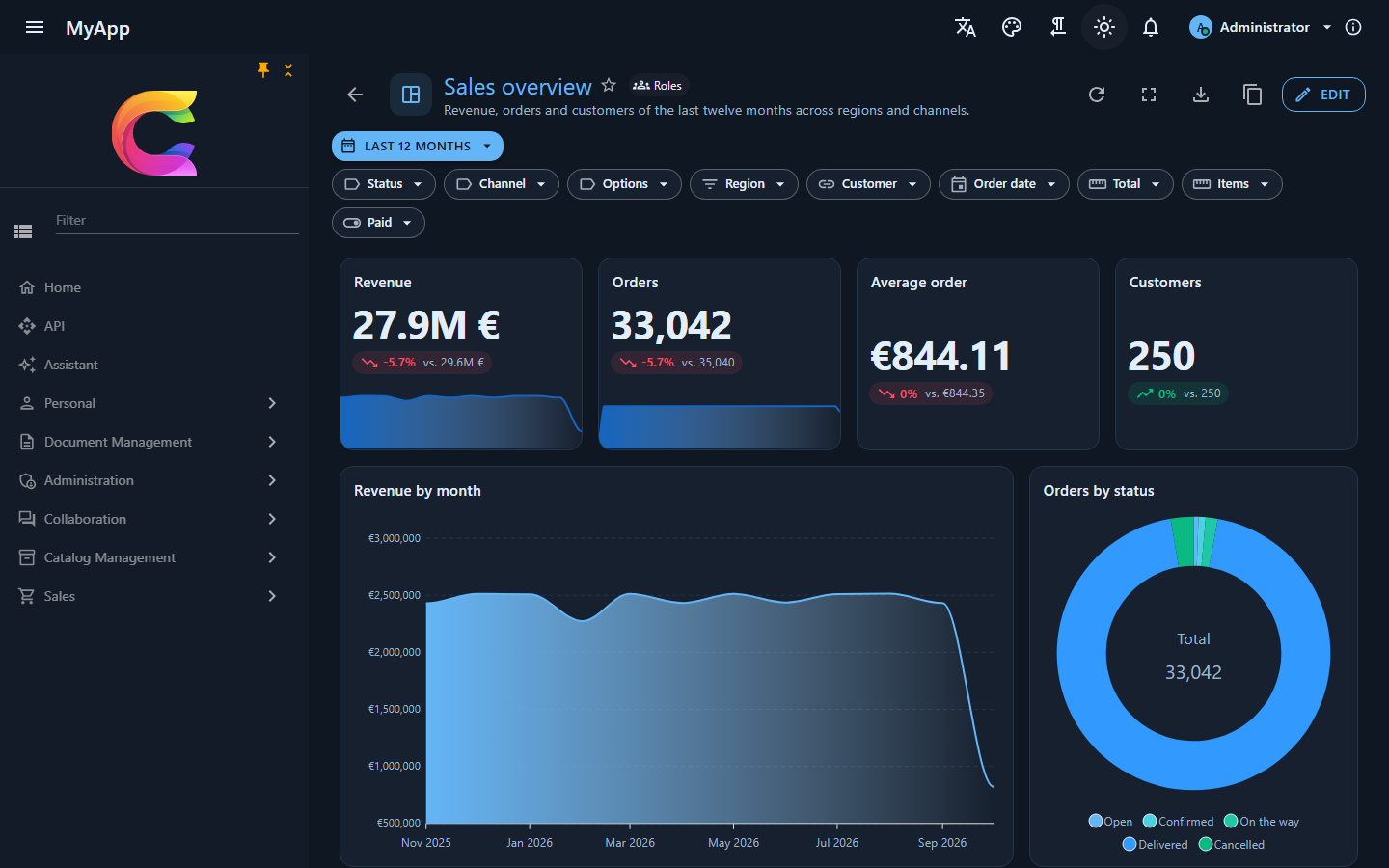
Charts use Blazor-ApexCharts: maintained, animated and good looking out of the box, with click events for cross filters. Colours, font and dark mode come from the MudBlazor theme's CSS variables, so custom themes need no extra setup.
Designer
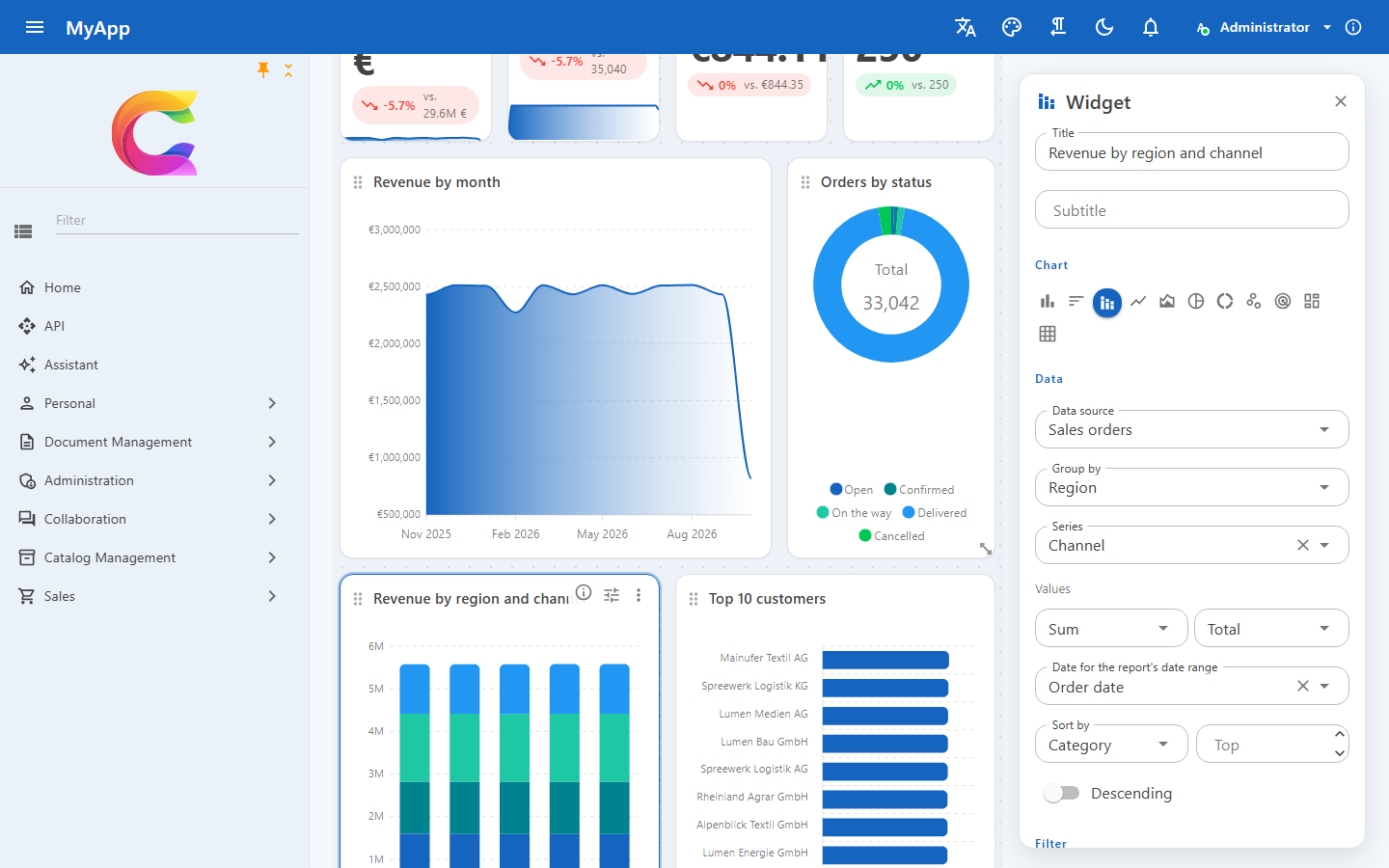
- Edit switches the grid into edit mode: drag widgets by their title, resize them at the edges, add new ones from Add widget. The layout uses GridStack with 12 columns and falls back to one column on phones.
- The widget panel edits data source, group by, series, values, sort, top, the date field for the report's date range, facets and rules of the query builder, number format, target, legend and more; the widget redraws while you change it.
- Undo and redo cover every change until you save. Report settings hold name, description, icon, sharing and the refresh interval.
- View mode: date range for all widgets, facets per entity set, cross filters by clicking a bar, slice or pivot cell, Open the data on every widget, full screen per widget, presentation mode, refresh, export.
Switches for viewers
A widget can offer viewers other values and groupings without a second widget: Switches for viewers in the widget panel adds alternatives, each starting as a copy of the widget's own value or grouping.
- Values (
WidgetOptions.Metrics, a list ofMetricView): label, aggregates, number format and an extra OData filter that is and-ed to the widget's own. KPIs, charts and pivots switch their values; tables only take the filter (e.g. Open orders next to All). - Groupings (
WidgetOptions.Buckets, a list ofBucketView): label, group-by field and date bucket, and optionally another date field for the report's date range. Charts and pivots regroup; KPIs change the bucket of their curve.
Viewers pick them from dropdowns in the widget's header; the widget's own entry comes first. The choice runs the widget again with the alternative (the report is not changed), works with facets, the date range and cross filters, and is what Export CSV/Excel writes. It is remembered per user, report and widget in the user setting Reports.Views. Saving a report checks every alternative like the widget itself, so one with an unknown field or a broken filter is refused (400, key Widgets[{id}].Metrics[{i}]...).
new ReportWidget
{
    Type = WidgetType.Chart,
    Title = "Orders",
    Query = new WidgetQuery { EntitySet = "SalesOrders", GroupBy = new ReportGroupBy("Region"), DateField = "OrderDate" },
    Options = new WidgetOptions
    {
        Metrics = [new MetricView("Revenue", [new(AggregateFunction.Sum, "Total")], NumberFormat.Currency)],
        Buckets = [new BucketView("By month", "OrderDate", DateBucket.Month)],
    },
};
Thresholds
Thresholds in the widget panel colour a value by bands (WidgetOptions.Thresholds, a list of ThresholdStop): each stop has a start value, a colour and a label, and a value takes the band of the highest stop it reaches (values below the first stop keep their own colour). Colours are the theme's success, warning, error and info (they follow custom themes and dark mode) or an own #rrggbb; anything else is refused on save.
| Widget | What the bands colour |
|---|---|
| KPI | the value and the gauge, with the band's icon and label below the value |
| Chart | with Colour bars by threshold (ColorBarsByThreshold), each bar of a bar or horizontal bar chart; a legend lists the bands in words |
| Pivot | the cells, with the band's icon |
| Table | the cells of the number column ThresholdColumn, with the band's icon |
Colour is never the only sign: every band shows an icon (check, warning, error, info) and its label as text or tooltip. Subscription mails show the bands of KPIs too, with ✓, !, ✕ or i before the value. Bands from the target builds three bands from the widget's Target and Higher is better: below 80 % / near / on target, or for lower is better on target / up to 120 % / above.
Create a report with AI
With an AI model set up (Administration › AI settings, see AI), holders of Reports.Manage get Create with AI on the report list and Ask AI to change this report (sparkle icon) in the designer. The prompt box suggests three examples built from the user's own data sets.
The server (GenerateReportDefinitionQuery, POST /api/v1/reports/generate) writes the instructions from what the user may read: every visible set with label, field paths, kinds and enum members (computed sources marked), the widget types, chart kinds, aggregates, buckets, options incl. switches and thresholds, the 12-column grid rules, a small example definition and the user's language for titles. It takes the model's JSON, checks it like a save would (validator plus every widget and alternative against the sources) and, if something is wrong, asks the model again with the error list, at most twice. The definition comes back unsaved:
- a new report opens at
reports/newin the designer; Save creates it, Cancel drops it; - a change replaces the designer's definition as one step of the history, so Undo brings the old one back.
Without a model the endpoint answers 403 and the buttons stay hidden (GET /api/v1/reports/ai says { "available": false }); a model that gives no usable report three times ends in a 400 naming the last errors.
The assistant and MCP clients get the same as the read-only tool generate_report (prompt, optional current definition). create_report and update_report save the result; as commands they run in the assistant only after the user confirmed the call.
Filters
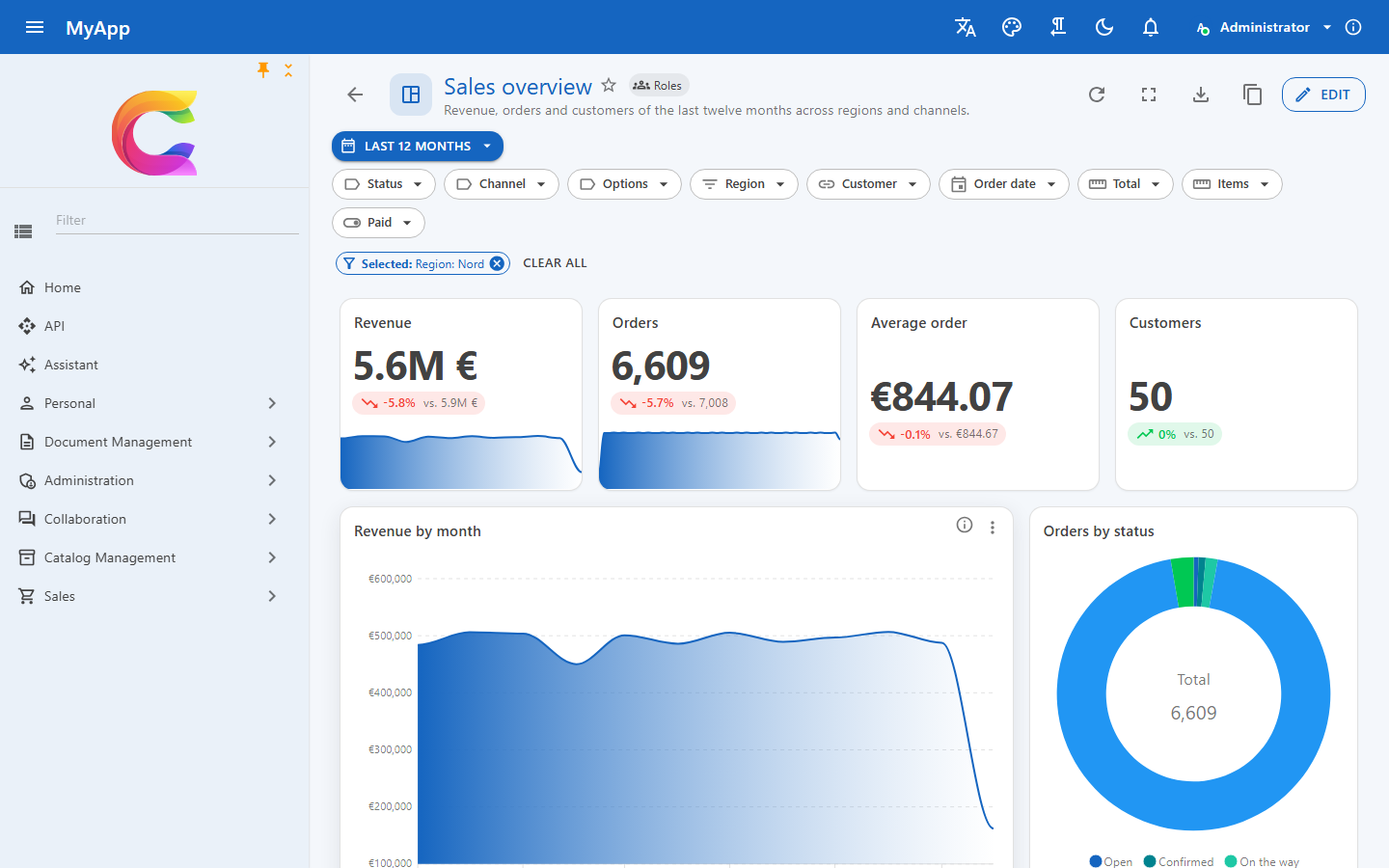
A widget's rows are narrowed by, in this order: its own query builder rules and facets, the report's facets for its entity set, the report's date range on the widget's date field, and the cross filters of other widgets on the same set. Facets and date range are part of the report and saved with it; cross filters are for the moment.
Sharing and permissions
| Permission | Allows |
|---|---|
Reports.View |
open reports shared with you, favorites |
Reports.Manage |
create reports, change and delete your own, duplicate any you can open |
Reports.Share |
share with roles or the organisation |
Reports.Dashboard |
choose the organisation's dashboard |
Reports.Subscriptions |
see and end the report subscriptions of the organisation |
A report is private, shared with roles (holders of one of them, directly or through groups) or with the organisation. Only the owner changes it; others duplicate it into a private copy. A change reaches everyone who has the report open, over the realtime hub.
Subscriptions by mail
Subscribe by mail (envelope icon) on a report mails it on a schedule: every day, every week on a weekday or every month on a day (shorter months take their last day), at a time of a time zone (IANA ids like Europe/Berlin; the time follows summer time, a time the clock skips runs right after the gap, a time that happens twice runs the first time). The dialog can replace the report's date range (e.g. Last month for a monthly mail) and use the facets chosen at the moment; the Excel attachment can be switched off.
The mail (template Reports.Subscription, in every shipped language, editable under Mail templates) shows each KPI with its value, threshold colour, sign and label, and the first ten rows of every chart, pivot and table (a chart over a date bucket shows its latest ten, oldest first), with a link to the report. It is written in the subscriber's language, else in the default language of the organisation (Languages page), like the unsubscribe page. The attached workbook has one sheet per widget with all its rows (tables up to 1,000), written like Export Excel. Images of the widgets or a PDF are not rendered on the server.
The recurring job coworkee-report-subscriptions (every five minutes, Coworkee:Reporting:SubscriptionCron) runs the due subscriptions organisation by organisation, each as the subscriber: the report must still be shared with them, and their permissions, protected fields and row filters decide what the mail shows. When something is in the way (report no longer shared, no active mail address, Reports.View gone) nothing is sent and the subscription shows the reason; the next run tries again. Mails need Coworkee:Notifications:PublicAppUrl for their links.
Every mail ends with a link that ends the subscription without signing in (a protected token; opening it asks first, the confirm button posts). Reports › Subscriptions (reports/subscriptions) lists the user's subscriptions with schedule, next and last mail and the last error, to edit, send now or end them. Holders of Reports.Subscriptions switch to Everybody in the organisation to see and end all of them. Sent mails and their attachments are part of the mail log and go with its retention.
| Endpoint | |
|---|---|
GET /api/v1/reports/subscriptions, GET /api/v1/reports/subscriptions/all |
the user's subscriptions, those of the organisation (Reports.Subscriptions) |
POST /api/v1/reports/subscriptions, PUT …/{id}, DELETE …/{id} |
subscribe, change, end (others' with Reports.Subscriptions) |
POST /api/v1/reports/subscriptions/{id}/send |
mail it now, the schedule stays |
GET/POST /api/v1/reports/subscriptions/unsubscribe |
the unsubscribe page of the mail link (anonymous, needs no X-CSRF) |
A report as dashboard
Every report you can open can be your dashboard: Set as my dashboard in the menu of its card or on the report page. Holders of Reports.Dashboard (administrators) also set the organisation's dashboard, which everybody sees who has made no choice of their own. Your own choice wins; a report you cannot open (any more) is skipped, and deleting a report removes it as dashboard.
ReportDashboard shows it. Wrap the app's own dashboard in it, so users without a chosen report, or without Reports.View, keep seeing that; without child content it shows a hint to choose a report. A change of the choice reaches open tabs at once (realtime topic type:DashboardReport).
@using Coworkee.Client.Blazor.Reporting.Components

<ReportDashboard>
    <PageHeader Title="Dashboard" />
    @* the app's own dashboard *@
</ReportDashboard>
The template's dashboard page (Personal > Dashboard, above Reports) does this, and with samples the setup makes the report Catalog overview the organisation's dashboard. The seed adds a DashboardReport row (UserId null for the organisation) next to the report.
Export
- Report: image (PNG), PDF through the browser's print dialog (print styles hide navigation and tools) and the report file (
.report.json) to import elsewhere. - Widget: CSV and Excel of what it shows; tables export their loaded rows.
Endpoints
| Endpoint | |
|---|---|
GET /api/v1/reports |
reports you can open, favorites first |
POST /api/v1/reports, PUT /api/v1/reports/{id}, DELETE /api/v1/reports/{id} |
create, change, delete |
POST /api/v1/reports/{id}/duplicate, PUT /api/v1/reports/{id}/favorite |
copy, favorite |
GET /api/v1/reports/sources, GET /api/v1/reports/roles |
fields per set, roles to share with |
POST /api/v1/reports/query |
aggregate |
POST /api/v1/reports/rows |
rows of an own source, for tables |
POST /api/v1/reports/sheet |
rows to an Excel workbook |
GET /api/v1/reports/ai, POST /api/v1/reports/generate |
whether AI is available, a definition from a prompt (not saved) |
GET /api/v1/reports/dashboard, PUT /api/v1/reports/dashboard, PUT /api/v1/reports/dashboard/organisation |
the dashboard report shown to you, choose yours or the organisation's ({ "reportId": null } clears) |