Settings and app configuration
Coworkee has two kinds of configuration that administrators change at runtime.
| Settings | App configuration | |
|---|---|---|
| For | single values per installation, tenant or user (SMTP host, theme, registration on/off) | a typed options class of the app (limits, feature switches, integrations) |
| Defined by | ISettingDefinitionContributor |
a C# class, optionally generated from JSON |
| Stored in | settings table, secrets encrypted | cw.ConfigurationEntries, read through IConfiguration |
| Read with | ISettingProvider |
IOptionsMonitor<T> |
| Admin page | Settings, tabs System and Organisation | Settings, one tab per class (system tenant only) |
Settings
internal sealed class MailSettingDefinitions : ISettingDefinitionContributor
{
    public void Define(SettingDefinitionContext context) =>
        context.Group("Mail", "Mail")
            .Add("Mail.Smtp.Host", "SMTP host", SettingType.String, [SettingScope.Global])
            .Add("Mail.Smtp.Port", "SMTP port", SettingType.Int, [SettingScope.Global], defaultValue: "25")
            .Add("Mail.Smtp.Password", "SMTP password", SettingType.Secret, [SettingScope.Global]);
}
Types are String, Text, Bool, Int, Secret, Choice and Language; scopes are Global, Tenant and User. The most specific value wins. Secrets are encrypted with ASP.NET Core data protection and never sent to the client; settings with visibleToClient: true are.
Defaults can also come from configuration: Coworkee:Settings:Defaults:Mail.Smtp.Host. The app host uses that for Mailpit.
The section Cloud file pickers of the System tab holds the ids of Google Drive, OneDrive and Dropbox for every upload field, see Files.
Own settings in the admin page
The tabs System (scope Global) and Organisation (scope Tenant) and the user's My settings (scope User) have no form code per setting. They load the definitions and render them with MudExObjectEditForm, so a setting of your module appears there as soon as its contributor is registered:
internal sealed class BillingSettingDefinitions : ISettingDefinitionContributor
{
    public void Define(SettingDefinitionContext context) =>
        context.Group("Billing", "Billing")
            .Add("Billing.Currency", "Currency", SettingType.Choice, [SettingScope.Tenant], "EUR", choices: ["EUR", "USD", "CHF"],
                description: "The currency of new invoices.")
            .Add("Billing.ApiKey", "API key", SettingType.Secret, [SettingScope.Global]);
}

context.Services.AddSingleton<ISettingDefinitionContributor, BillingSettingDefinitions>();
| Definition | Form |
|---|---|
| group | a section with the group's display name |
display name, description |
label and help text (looked up in the translations, so de.json can translate them) |
String / Int |
text or number field; the default value is the placeholder, an empty field falls back to the default |
Text |
a text field with four lines |
Bool |
a check box, showing the stored value or the default |
Choice |
a select of the choices; each value is shown translated when the translations have an entry for it, else as is |
Language |
a select of the app's languages; empty means inherit, shown as Configured default in the System tab and Inherited in Organisation and My settings (labelled Language in My settings) |
Secret |
a password field that stays empty; the help text says whether a value is stored, and only a typed value is sent |
enabledWhen |
the field is disabled while the other setting's value is not in the condition's values |
group with a page |
not shown on the settings tabs; see below |
| scopes | a setting shows in the tab of each of its scopes |
Saving sends only the changed values; the server checks them (Expected a whole number. and so on) and the message shows in the snackbar. Who sees the tabs follows the Settings.Manage permission; System is shown in the system organisation only.
Behind the form is a class built at runtime with one property per setting (Mail.Smtp.Host becomes Mail_Smtp_Host), so the form behaves like every other object form. Fields have no reset of their own: clear a text or number field to return to the default.
Dependent settings
enabledWhen ties a field to another setting: it is disabled while that setting's value is not among the listed values. SettingCondition.IsTrue covers the common case of a switch:
context.Group("FilePickers", "Cloud file pickers")
    .Add("FilePickers.GoogleDrive.Enabled", "Google Drive", SettingType.Bool, [SettingScope.Global])
    .Add("FilePickers.GoogleDrive.ClientId", "Google Drive client id", SettingType.String, [SettingScope.Global],
        enabledWhen: SettingCondition.IsTrue("FilePickers.GoogleDrive.Enabled"));

// several values: the translation fields depend on the provider
enabledWhen: new SettingCondition(LocalizationSettings.TranslationProvider, [TranslationProviders.DeepL, TranslationProviders.Azure])
This is a convenience of the form only; the server does not enforce it. A condition on a setting that is not part of the form (another scope, for example) leaves the field enabled.
Groups on their own page
context.Group(name, displayName, page: "/admin/ai-settings") marks a group as maintained on its own admin page. The settings tabs skip it, and the user's My settings keep every group that has no page. The AI group works this way: its settings, including the MCP switch, live on /admin/ai-settings. So does Mail: provider, credentials and the own-server switch of an organisation live on /admin/mail-settings, see Mailing.
Language settings
SettingType.Language fits settings that hold a culture. Localization.Culture (Default language) is the language the app starts in: an organisation overrides the system value, and a user overrides both. An empty value inherits.
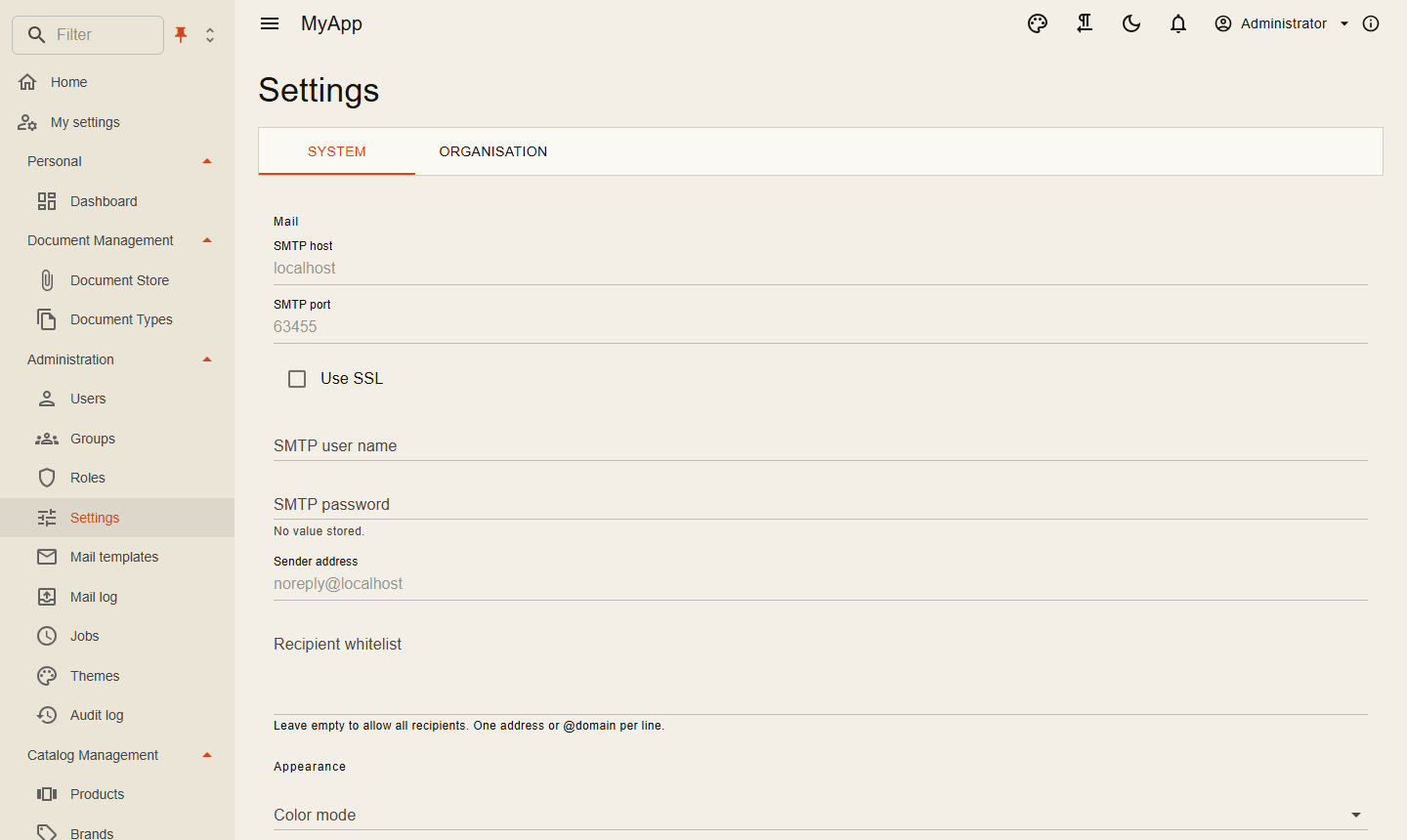
Typed app settings
The app describes its settings as classes. Values come from appsettings and the environment; what administrators change is stored in cw.ConfigurationEntries and lies on top for every service of the app. The Settings page renders each class with MudExObjectEditForm, the way the classic settings page did, and services read IOptionsMonitor<T> and see changes within seconds. Values read once at startup apply after a restart.
Every service that should see the changes adds the database layer to its configuration:
builder.Configuration.AddCoworkeeDatabaseConfiguration("myapp"); // the connection string name of the app database
Built-in app settings
Without further code the page shows App settings: CoworkeeAppSettings, bound to the section Coworkee, with self registration (Registration), notification digests (Notifications) and background jobs (Jobs). Wiring values the app host usually sets (Jobs:ConnectionStringName, Jobs:RunServer, Jobs:DashboardPath, Notifications:PublicAppUrl) are protected: they change only after you unlock the field with its lock button, and then apply after a restart; lists the configuration binder could only append to (Jobs:Queues, Jobs:RetryDelaysInSeconds) are hidden.
Extend the app settings
Derive from CoworkeeAppSettings and register the type on both sides. The rules of the built-in sections stay; add your own:
public sealed class MyAppSettings : CoworkeeAppSettings
{
    public BillingSettings Billing { get; set; } = new();
}

public sealed class BillingSettings
{
    public string Currency { get; set; } = "EUR";
    public string? ApiKey { get; set; }
    public string? WebhookUrl { get; set; }
    public string? WebhookSecret { get; set; }
}
context.Services.AddCoworkeeSettings<MyAppSettings>(context.Configuration, rules => rules
    .Lock(s => s.Billing.Currency)          // shown disabled, never changed
    .Protect(s => s.Billing.WebhookUrl)     // changeable after unlocking the field
    .Hide(s => s.Billing.WebhookSecret));   // never leaves the server
builder.Services.AddCoworkeeSettings<MyAppSettings>(meta =>
{
    meta.Property(s => s.Billing.ApiKey).WithGroup("Billing");
    meta.Property(s => s.Billing.Currency).WithGroup("Billing");
});
Services read IOptionsMonitor<MyAppSettings>; the new properties live under Coworkee:Billing.
Replace the app settings
Any other class replaces the built-in one completely, usually with a section of its own:
context.Services.AddCoworkeeSettings<ShopSettings>(context.Configuration, section: "Shop", title: "Shop");   // server
builder.Services.AddCoworkeeSettings<ShopSettings>(section: "Shop", title: "Shop");                         // client
Rules
Lock(s => s.A.B) |
the value shows disabled with a lock icon ("Set in the configuration"); the server keeps what applies whatever comes in. Use it for values only the host may set. Locking an object locks all its properties |
Protect(s => s.A.B) |
the value is changeable but risky: the field is disabled until you press its lock button, and protected again after saving or reloading. Only the form protects, the server saves what comes in |
Hide(s => s.A.B) |
the value is neither sent to the browser nor changed |
| secrets | properties named like password, secret, api key, token or connection string come masked; sending the mask back keeps the stored value |
| meta | the client meta groups, labels, orders or renders properties like any MudExObjectEditForm; locks and hides from the server apply on top. The form shows each section under its heading in two columns (lists over the full width); WrapInMudItem(i => i.md = 12) widens a single field. Computed properties (no setter) are left out and fields have no reset of their own; a list item opened in its dialog (like a registration document) follows the same rules |
| scope | typed settings apply to the whole installation and are edited from the system organisation only; per tenant and per user values are settings (above) |
Restore defaults drops the values changed in the app; appsettings and environment apply again.
Editors for file types, sizes, schedules and translations
Four attributes from Coworkee.Contracts.Configuration pick a better editor for a property, in the Settings page and in every other object form of the app:
| Attribute | Property | Editor |
|---|---|---|
[ContentTypes] |
List<string> or string[] of MIME types |
chips with readable names and icons, and a search over every MIME type Nextended's MimeType knows, by name, file extension (.epub) or MIME type, each hit with its icon and kind (images, documents, videos, audio, archives, text, fonts, 3D models, other). The wildcards (image/*, video/*, audio/*, text/*) and common types come first; the menu next to it adds whole groups (all images, Office documents, ...). It shows at most 50 hits, so the editor stays fast. Empty accepts every type |
[FileSize] |
long? or long in bytes |
a number in KB, MB or GB; empty means no limit |
[Cron] |
string with a cron expression |
presets (every few minutes, hourly, daily, weekly, monthly) and the expression itself, described in words (UTC); an invalid expression is not taken |
[Translations] |
Dictionary<string, string> of culture to text |
a row per language with its name and code; the app's languages to pick, other culture codes like fr-CA typed in, rows removed with their button |
public sealed class ImportSettings
{
    [Cron]
    public string Schedule { get; set; } = "0 2 * * *";

    [ContentTypes]
    public List<string> AcceptedFiles { get; set; } = ["text/csv"];

    [FileSize]
    public long? MaxFileSize { get; set; } = 10 * 1024 * 1024;

    [Translations]
    public Dictionary<string, string> Titles { get; set; } = [];
}
The built-in settings use them for the registration documents (Registration:Documents, with their names and descriptions per language) and the digest time (Notifications:DigestCron). A RenderWith in the client meta still wins over the attribute.
Labels, help texts and groups from [Display]
[Display] from System.ComponentModel.DataAnnotations describes a property where it is declared, without client code: Name is the label, Description the help text under the field and GroupName the section it shows in. Like every text of the form they go through the translations, so the German text belongs in de.json.
public sealed class BillingSettings
{
    [Display(Name = "Currency", GroupName = "Invoices", Description = "The currency of new invoices.")]
    public string Currency { get; set; } = "EUR";
}
A registration document shows how that reads: its dialog has the sections Shown to the user (name and hint, valid in every language), Translations (optional) (the name and hint for single languages, each row labeled Translation for German and so on) and Upload (required, accepted file types, largest file).
More sections
Further classes show as further tabs next to the app settings:
builder.Configuration
    .AddCoworkeeAppConfigurationDefaults(SharemeConfiguration.Defaults(), SharemeConfiguration.Section)
    .AddCoworkeeDatabaseConfiguration("shareme");

context.Services.AddCoworkeeAppConfiguration<SharemeConfiguration>(context.Configuration, SharemeConfiguration.Section, SharemeConfiguration.Title,
    rules => rules.Lock(c => c.Storage));
builder.Services.AddCoworkeeAppConfiguration<SharemeConfiguration>(SharemeConfiguration.Section, SharemeConfiguration.Title);
AddCoworkeeAppConfigurationDefaults adds a JSON file of the section as the lowest layer. Sharemee generates SharemeConfiguration from appconfig.json with Nextended.CodeGen, so the JSON defaults and the class cannot drift apart:
{ "JsonConfigs": [ { "SourceFile": "Configuration/appconfig.json", "RootClassName": "SharemeConfiguration", "Namespace": "Shareme.Contracts.Configuration" } ] }
The old address /admin/configuration leads to the Settings page.
Services
CoworkeeServicesOptions (section Coworkee:Services) names the services of the app: the api, auth server and web app, the Aspire dashboard, the Hangfire dashboard, Mailpit, pgAdmin and every other resource with a web endpoint. The app host fills it while developing; deployments list their public addresses in appsettings:
{ "Coworkee": { "Services": {
    "myapp-api": { "Url": "https://api.example.com", "HealthPath": "/health" },
    "grafana": { "Url": "https://grafana.example.com", "Title": "Grafana" } } } }
public sealed class Links(IOptionsMonitor<CoworkeeServicesOptions> services)
{
    public string? Mailpit => services.CurrentValue.GetValueOrDefault("mail")?.Url;
}
Administration > System > Services shows them as tiles with icon, address and live state, grouped by source (App for Coworkee:Services, AspireUI for the apps of an AspireUI); a click opens the service in a new tab, services with several addresses list all of them as links. A source that could not be asked shows a hint, the other sources still appear. The browser asks the api (GET /api/v1/services, settings permission, system organisation, answers { services, unavailableSources }), which probes every service every ten seconds: with HealthPath a success status counts as running, without it any answer below 500.
Service directory
IServiceDirectory combines the configured services (Coworkee:Services) with those of other sources, so backend code can look up a service by name without knowing where it is listed. It lives in the namespace Coworkee.Settings and is registered by the settings module: every host that adds the module can inject it. It is scoped, like the other settings services; a singleton or a hosted service creates a scope first. There is no user check, it is backend code.
using Coworkee.Contracts.Settings;
using Coworkee.Settings;

public sealed class BillingClient(IServiceDirectory directory, IHttpClientFactory clients)
{
    public async Task<string?> StatusAsync(CancellationToken cancellationToken)
    {
        if (await directory.ResolveAsync("billing", cancellationToken) is not { } billing)
        {
            return null;   // unknown name, or the source that knows it is unavailable
        }

        var address = billing.Urls?.FirstOrDefault(u => u.StartsWith("https:", StringComparison.OrdinalIgnoreCase)) ?? billing.Url;
        if (address.Length == 0)
        {
            return null;   // listed, but without an address
        }

        using var client = clients.CreateClient();
        client.BaseAddress = new Uri(address);
        return await client.GetStringAsync("status", cancellationToken);
    }
}
In a singleton or a hosted service, create the scope yourself:
public sealed class BillingPoller(IServiceScopeFactory scopes) : BackgroundService
{
    protected override async Task ExecuteAsync(CancellationToken stoppingToken)
    {
        using var scope = scopes.CreateScope();
        var directory = scope.ServiceProvider.GetRequiredService<IServiceDirectory>();
        var billing = await directory.ResolveAsync("billing", stoppingToken);
        // ...
    }
}
ResolveAsync(name)finds a service by name, case-insensitive. The configured services come first, so a configured service wins over an AspireUI app of the same name. It is fast: the health of a configured service is not probed and staysUnknown.ResolveAsync("aspireui:billing")asks only the source named before the colon (appforCoworkee:Services,aspireui, or the name of your own source). Use it when two sources know the same name and you need a specific one. A prefix that is no source name is part of the name.GetAllAsync()lists every service of every source with the sources that failed inUnavailableSources. It is what the admin page andGET /api/v1/servicesshow.
When ResolveAsync returns null: no source knows the name, or the only source that knows it is unavailable (it failed, or did not answer within three seconds). The caller cannot tell the two cases apart; GetAllAsync does, through UnavailableSources. Always handle null: a service can be missing at any time.
Url or Urls: Url is the first address, Urls lists every address when a source knows several. Configured services have exactly one Url and no Urls. An AspireUI app lists all its endpoints in Urls, http endpoints can come first, and an app without endpoints has an empty Url. Pick from Urls when you care for https (see the example) and check for an empty result.
IServiceDirectory, IOptionsMonitor<CoworkeeServicesOptions> or Aspire service discovery?
| Need | Use |
|---|---|
| The address of a service you configure yourself (a link, a redirect), synchronous, no I/O | IOptionsMonitor<CoworkeeServicesOptions> |
| A service that may come from an AspireUI app or your own source, or a list of all services | IServiceDirectory |
| Calls between the resources of one app host (api to auth server, worker to api) | Aspire service discovery: WithReference in the app host and https+http://name as the base address of the HttpClient |
The directory is for finding and showing services, discovery is for calling resources the app host wires together.
A source that fails or takes longer than three seconds is left out, is reported as unavailable and never breaks the others. A failure the source already logged is not logged a second time by the directory.
AspireUI lists the apps and stacks you host yourself with an AspireUI (Source = aspireui, all addresses in Urls). The app host connects it with WithRetrieveApi() and nothing else:
Without Aspire, or for a deployed app, set the address and the key of the retrieve API yourself:
Without Url the source stays inactive. The list is cached for 15 seconds; the key is only sent to the AspireUI as X-Api-Key and never logged or returned by the api. User information in the address is dropped before it is logged or cached.
Your own source: implement IServiceSource and register it next to the built-in ones. This one reads a JSON list [{ "name": "...", "url": "..." }] from a registry:
using System.Net.Http.Json;
using Coworkee.Contracts.Settings;
using Coworkee.Settings;
using Microsoft.Extensions.DependencyInjection;
using Microsoft.Extensions.DependencyInjection.Extensions;

public sealed class RegistryServiceSource(IHttpClientFactory clients) : IServiceSource
{
    public string Name => "registry";

    public async Task<IReadOnlyList<ServiceDto>> GetAsync(CancellationToken cancellationToken)
    {
        var entries = await clients.CreateClient().GetFromJsonAsync<List<RegistryEntry>>("https://registry.example.com/services.json", cancellationToken) ?? [];
        return [.. entries.Select(e => new ServiceDto(e.Name, e.Name, e.Url, ServiceHealth.Unknown, Name))];
    }

    private sealed record RegistryEntry(string Name, string Url);
}

// in ConfigureServices
services.TryAddEnumerable(ServiceDescriptor.Singleton<IServiceSource, RegistryServiceSource>());
Throw when the source cannot be asked, the directory then reports it as unavailable. Override FindAsync if a single service can be answered cheaper than listing all. The directory sets Source of every entry to the Name of its source.