AI assistant and MCP
Coworkee.Ai lets a language model (Claude, GPT, a local model through Ollama, ...) work with the app through the same requests the UI uses. Every tool is a dispatcher request, so permissions, validation and audit apply to the assistant exactly as to a person.
services.AddAiTool<SearchAssetsQuery>("search_assets", "Finds assets by text, folder and tags.");
services.AddAiTool<TagAssetsCommand>("tag_assets", "Adds tags to assets.");
Without any registration, every request of a module that returns a Result and carries [RequiresPermission] or [AiTool] becomes a tool. Its [Description] is the tool description; [AiTool(Exclude = true)] keeps a request out, for example one that changes permissions:
[RequiresPermission(CatalogPermissions.Brands.View)]
[Description("Lists brands, optionally filtered by name.")]
public sealed record GetBrandsQuery(string? Search) : IQuery<Result<IReadOnlyList<BrandDto>>>;
With the OData module, the assistant also gets the tools list_data_sets (the sets the user may read, with their fields) and query_data: it lists rows of any registered entity set with an OData filter, order and selected fields, with the same permissions, row filters and hidden properties as the tables.
The request type becomes the tool's input schema, the Result its output. Failures reach the model as messages it can react to.
- Assistant window for users with
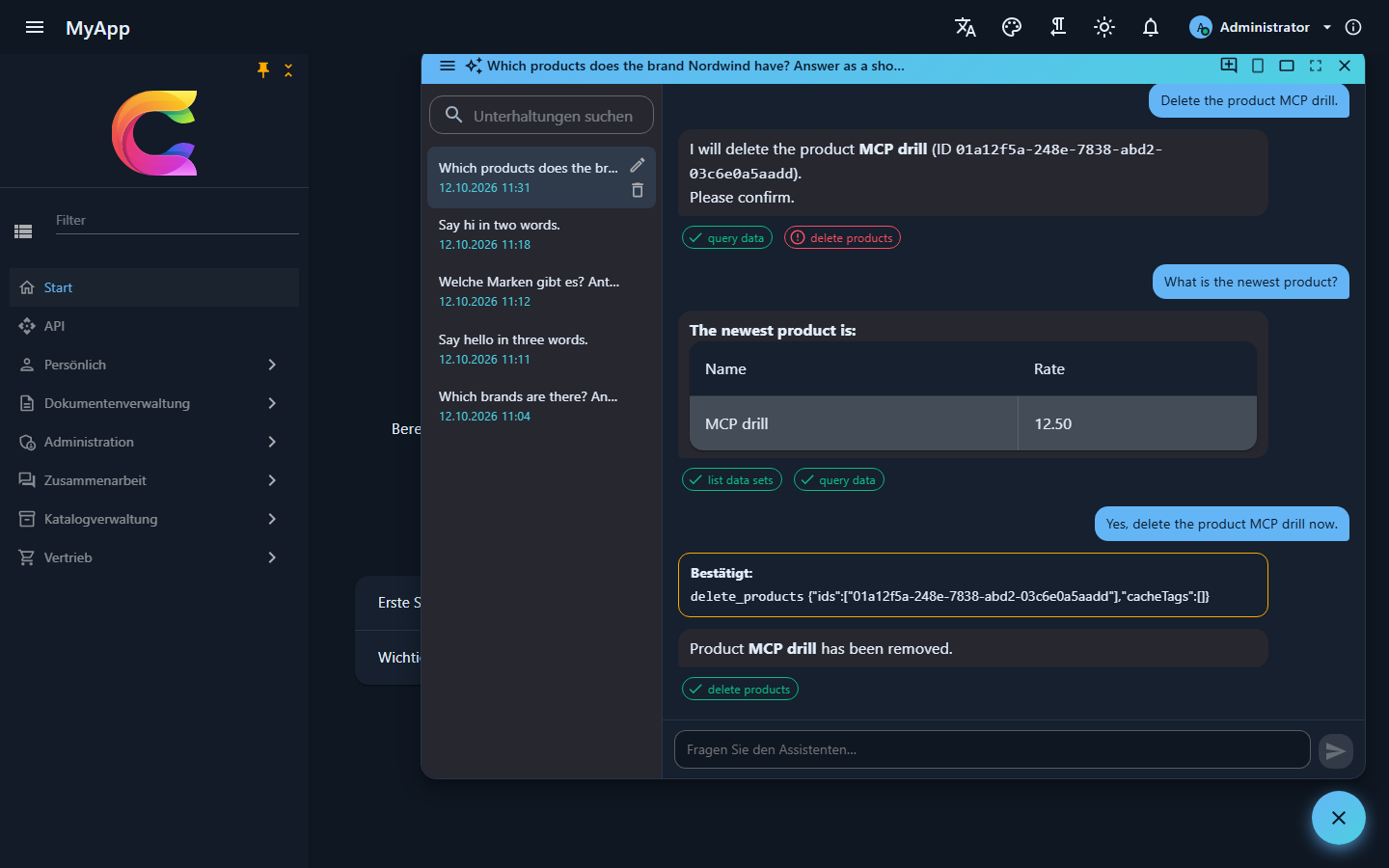
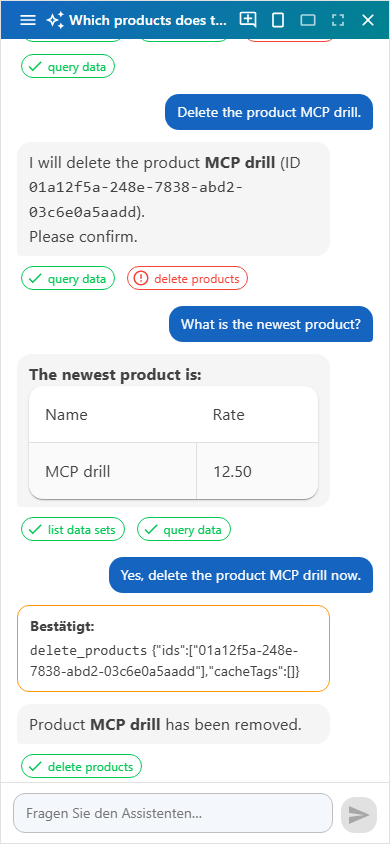
Ai.Chat: a button at the bottom right (orCtrl+I) opens a chat with the tools of all modules, as the signed-in user. It comes small, large or full screen, and full screen on phones; it is not there while the assistant is not active or the user lacksAi.Chat. The old/assistantroute opens the window. - Conversations stay on the server per user: titled after the first message, renamed, deleted and searched in the side bar, live in every open tab, and part of the personal data export and erasure.
- Streamed answers appear as they are written, as Markdown that cannot carry markup or data: raw HTML shows as text and images become links. Links to other sites lose query and fragment and show their host, app links stay as they are, mail links keep only the address, and other schemes go nowhere, so a planted link cannot carry data away.
-
Tool chips under each answer show what the assistant did; with
AssistantLinksthey link to what it created or changed: -
MCP server under
/mcpwith the same tools, for Claude Desktop, Claude Code, VS Code, Cursor and other MCP clients, signed in with an API key. - Tool call audit for users with
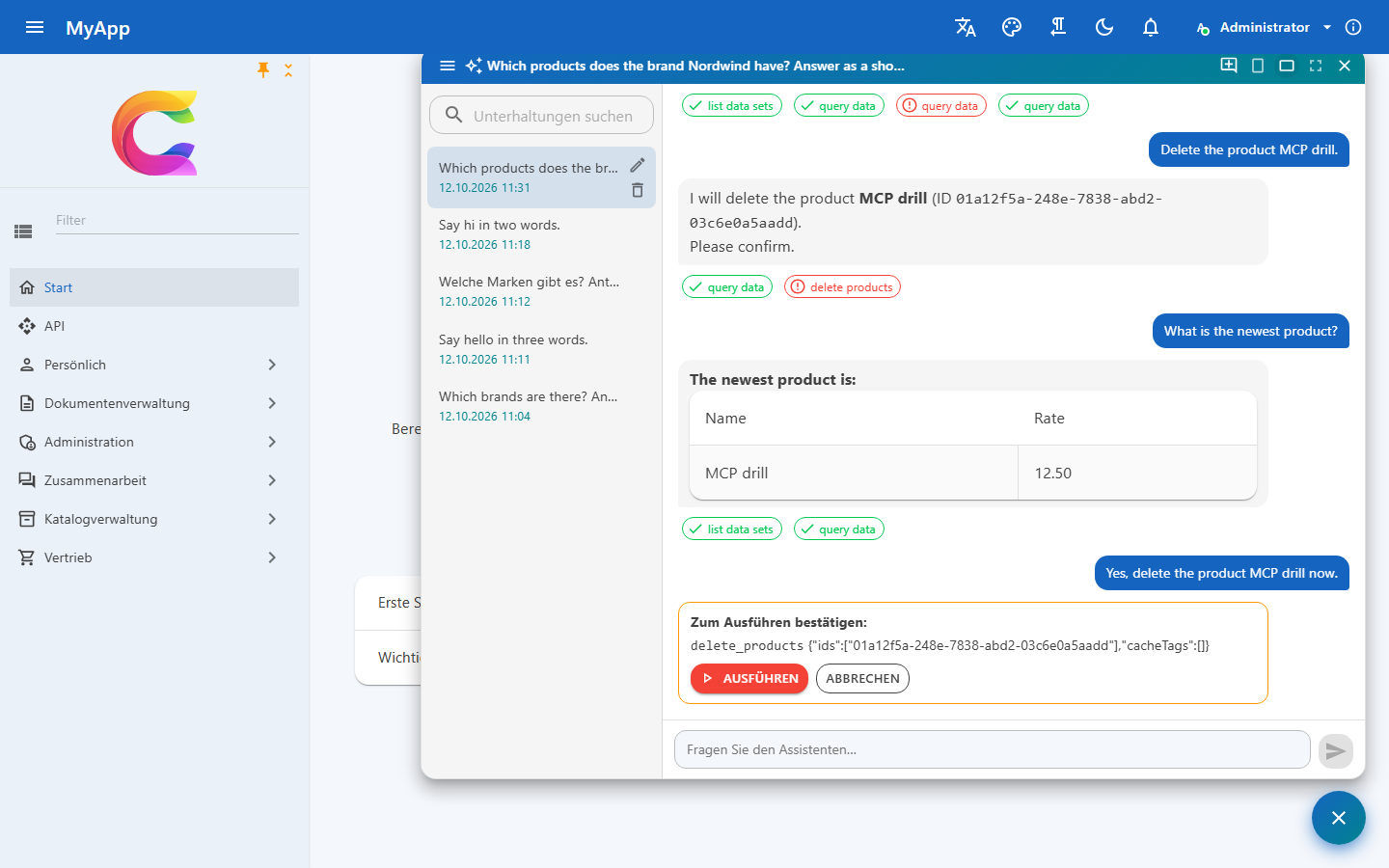
Ai.Audit: every call with input, result, user, channel and API key. - Queries run at once. Every command, which changes data, waits: the window shows exactly what the assistant wants to run (inputs that look like secrets masked) with Run and Cancel, destructive ones highlighted, and only the user's click runs it. Creating a product by chat takes one click. Text planted in data or in the conversation can therefore never change anything on its own. A new message cancels a waiting call.
- A waiting call is stored encrypted with ASP.NET Data Protection (share the key ring between API instances), decided once even when two tabs click at the same time, and never runs twice.
The window talks to /api/v1/ai: GET status, GET|POST sessions, GET|PUT|DELETE sessions/{id}, and POST sessions/{id}/messages and POST sessions/{id}/confirm, which answer with application/x-ndjson: one AiStreamEvent per line, delta (text), tool (a tool call), then done (the saved message) or error. The answer runs to its end and is saved even when the browser goes away.
Providers
The assistant talks to the model through IChatClient of Microsoft.Extensions.AI, with the same tools, rules and audit for every provider. Most providers speak the OpenAI chat API, so they only differ in address, key and models; the catalog (AiProviderCatalog in Coworkee.Contracts.Ai) knows them:
| Provider | Id | Needs | Default model | Get a key | Notes |
|---|---|---|---|---|---|
| Anthropic | anthropic |
key | claude-opus-5-5 |
console.anthropic.com | the most reliable tool use |
| OpenAI | openAI |
key | gpt-5 |
platform.openai.com | GPT models (ChatGPT) |
| Azure OpenAI | azureOpenAI |
endpoint, deployment, key | (the deployment) | Azure portal | data stays in your Azure tenant; v1 API of Azure OpenAI |
| Google Gemini | gemini |
key | gemini-2.5-flash |
aistudio.google.com | Google's OpenAI compatible API; free tier |
| OpenRouter | openRouter |
key | anthropic/claude-sonnet-4.5 |
openrouter.ai/keys | hundreds of models behind one key, :free models cost nothing |
| Mistral | mistral |
key | mistral-large-latest |
console.mistral.ai | hosted in the EU; free experiment plan |
| Groq | groq |
key | openai/gpt-oss-120b |
console.groq.com | open models at high speed; free tier |
| DeepSeek | deepSeek |
key | deepseek-chat |
platform.deepseek.com | low prices; servers in China |
| xAI Grok | xai |
key | grok-4 |
console.x.ai | Grok models |
| Together AI | together |
key | meta-llama/Llama-3.3-70B-Instruct-Turbo |
api.together.ai | open models in the cloud |
| Fireworks AI | fireworks |
key | accounts/fireworks/models/llama-v3p3-70b-instruct |
fireworks.ai | open models in the cloud |
| Ollama | ollama |
nothing | llama3.2 |
ollama.com | local and offline; small models call tools less reliably |
| LM Studio | lmStudio |
a loaded model | (the loaded model) | lmstudio.ai | local; start the server of the LM Studio app (http://localhost:1234/v1) |
| Custom | openAICompatible |
base address, model | any server that speaks the OpenAI chat API: gateways, vLLM, LiteLLM, a company proxy |
Providers without tool calls (Perplexity, for example) do not fit: the assistant works through tools.
The AI page
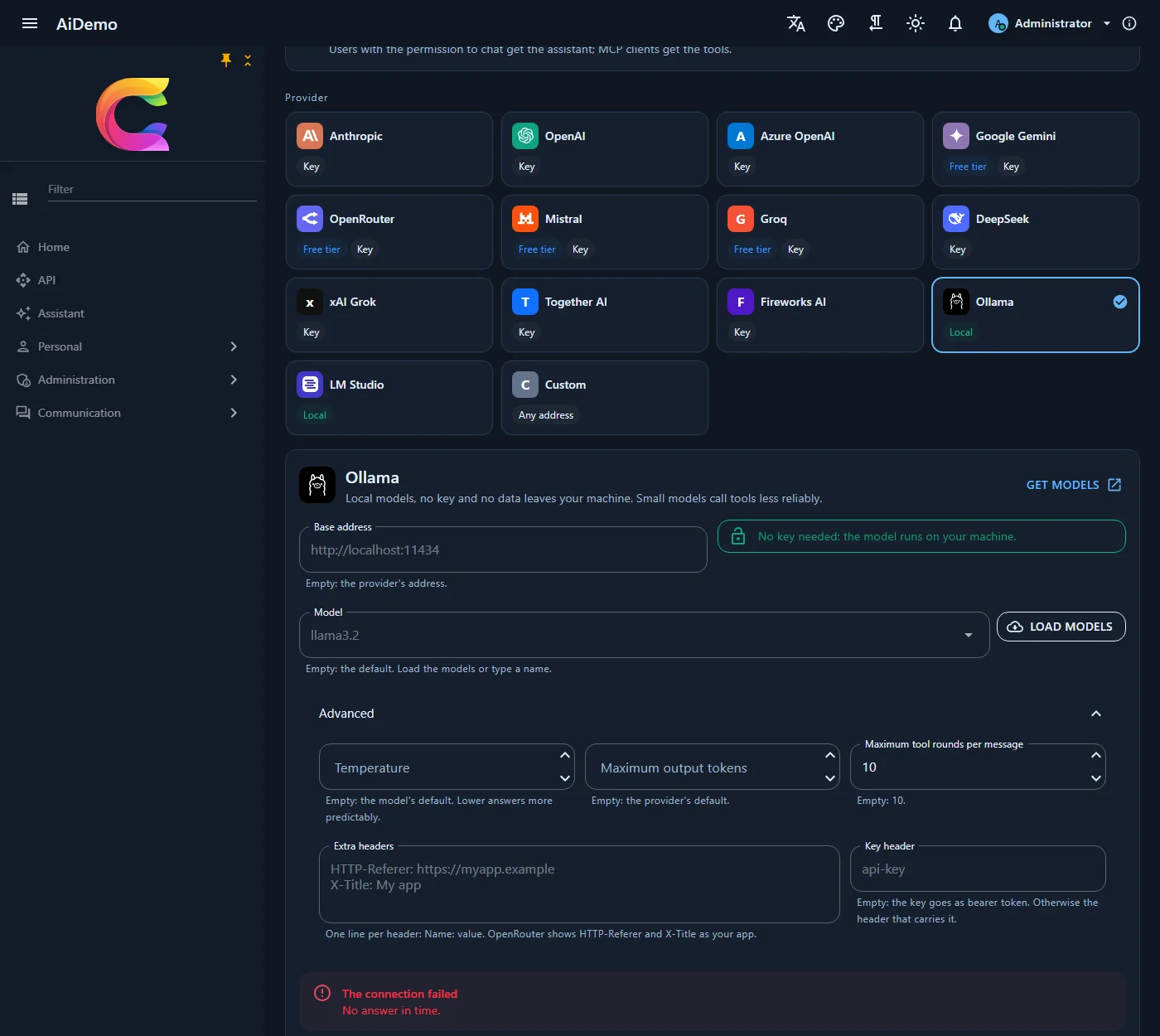
Host administrators with Settings.Manage set it up under Administration > System > AI (/admin/ai-settings): switch the assistant on, pick a provider card, enter address, key and model, and save. Changes apply to the next message, without a restart.
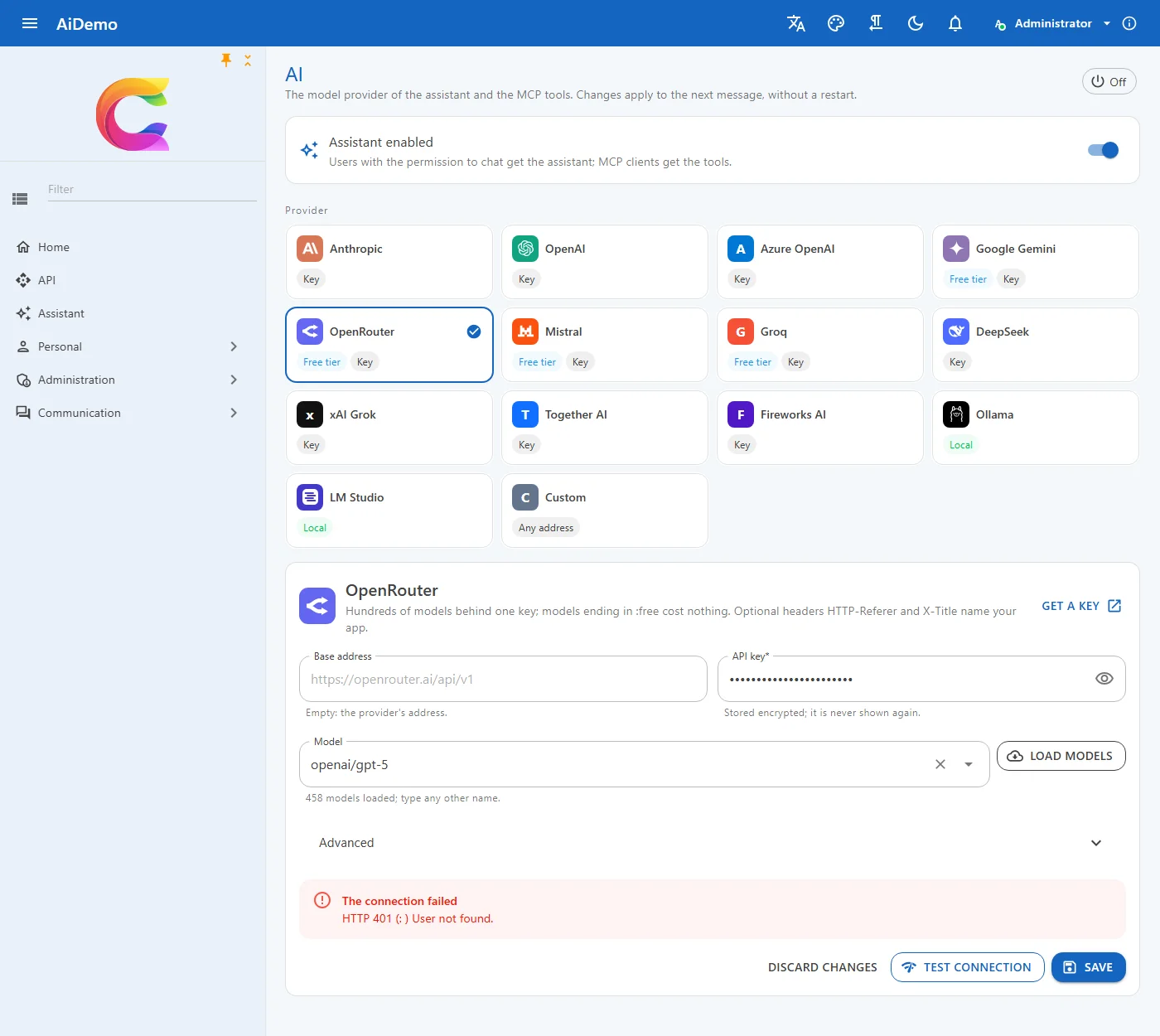
- Key: stored encrypted and never sent back to the browser; the page shows it masked with Replace and Remove. When the provider or the address changes, the stored key is dropped on save, so it never reaches another server.
- Load models asks the provider for its models with the entered key (
/modelsof the OpenAI compatible APIs,/v1/modelsof Anthropic,/api/tagsof Ollama); any other name can be typed. - Test connection sends a short prompt and a tool call probe and shows the latency, the answer and whether the model calls tools, or the provider's error.
- Advanced: temperature, maximum output tokens, tool rounds per message, extra headers (
HTTP-RefererandX-Titlename your app on OpenRouter) and a key header for servers that expect the key in another header thanAuthorization: Bearer(for exampleapi-key).
Settings
The page writes the global AI settings; they also have defaults in the configuration, e.g. from the app host or environment variables:
| Setting | |
|---|---|
Ai.Enabled |
on or off |
Ai.Provider |
a provider id of the table above, anthropic by default |
Ai.Model |
empty: the provider's default; Azure OpenAI: the deployment name |
Ai.Endpoint |
empty: the provider's address; Azure OpenAI resource (https://acme.openai.azure.com), Ollama or LM Studio address, or the base address of a custom server |
Ai.ApiKey |
API key (secret) |
Ai.Headers |
extra headers, one Name: value per line |
Ai.AuthHeader |
header that carries the key instead of Authorization: Bearer |
Ai.Temperature, Ai.MaxOutputTokens |
empty: the model's defaults |
Ai.MaxToolRounds |
how many tool rounds one answer may take |
{
  "Coworkee": {
    "Settings": {
      "Defaults": {
        "Ai.Enabled": "true",
        "Ai.Provider": "azureOpenAI",
        "Ai.Endpoint": "https://acme.openai.azure.com",
        "Ai.Model": "gpt-5-assistant"
      }
    }
  }
}
New apps
coworkee new takes the provider, the model and the address (--ai-provider, --ai-model, --ai-endpoint, see CLI); the Studio offers the same in its AI card. The key never goes into the spec or the command line: the app host reads it, and optionally endpoint and model, from its user secrets:
dotnet user-secrets set Parameters:ai-apikey sk-... --project src/Shop.AppHost
dotnet user-secrets set Parameters:ai-endpoint https://acme.openai.azure.com --project src/Shop.AppHost
dotnet user-secrets set Parameters:ai-model gpt-5-assistant --project src/Shop.AppHost
With a key the assistant starts switched on. --ai-provider ollama adds an Ollama container that pulls the model; lmStudio switches the assistant on without a key and talks to LM Studio on the same machine.
In code
AiConnections reads the current connection and creates chat clients on it, for features of your own (summaries, translations):
public sealed class Summaries(AiConnections ai)
{
    public async Task<string?> SummarizeAsync(string text, CancellationToken ct)
    {
        using var client = await ai.CreateClientAsync(ct); // null while the assistant is off or incomplete
        return client is null ? null : (await client.GetResponseAsync($"Summarize: {text}", cancellationToken: ct)).Text;
    }
}
Another model service (Bedrock, a gateway with its own SDK) plugs in through IAiChatClientFactory:
services.AddSingleton<IAiChatClientFactory, BedrockChatClients>();

internal sealed class BedrockChatClients : IAiChatClientFactory
{
    public IChatClient Create(AiConnection connection) => new BedrockChatClient(connection.EffectiveModel!);
}
The generated service defaults take the Coworkee.Ai HTTP client out of the standard resilience handler: answers often take longer than its timeouts, and the provider clients retry on their own.