Localization
Coworkee.Localization keeps languages and translations in the database and ships the texts of every module as embedded JSON.
[DependsOn(typeof(CoworkeeLocalizationModule))]
public sealed class MyAppDatabaseModule : CoworkeeModule
{
    public override void ConfigureServices(ModuleServiceContext context) =>
        context.Services.AddSingleton<ILocalizationResourceContributor, MyAppTexts>();
}

internal sealed class MyAppTexts : ILocalizationResourceContributor
{
    public void Define(LocalizationResourceContext context) => context.AddEmbeddedJson(typeof(MyAppTexts).Assembly);
}
Keys are the English texts. A module embeds Localization/{culture}.json:
{
  "Brands": "Marken",
  "Delete {0}? This cannot be undone.": "{0} löschen? Das lässt sich nicht rückgängig machen."
}
Initial languages
The library ships 23 languages (ar, bg, cs, da, de, el, en, es, fr, hr, id, it, ja, km, ko, nl, pl, pt, ru, sv, tr, uk, zh), English being the keys. Without configuration an installation offers English and German, English as default; administrators enable the other shipped languages on the Languages page. LocalizationOptions (section Coworkee:Localization) narrow that down; setup stores exactly these languages, after that administrators change them on the Languages page.
{
  "Coworkee": {
    "Localization": { "Languages": [ "en", "de" ], "DefaultLanguage": "de" }
  }
}
Any culture works, not only the shipped ones: languages without shipped texts are machine translated. The host does not start with an unknown culture or a default that is not among the languages. coworkee new --languages en,de,fr --default-language de writes the same values into a new app.
Shipped languages
The library ships its texts in 23 languages: the pages and components of the modules (Coworkee.Localization/Localization/{code}.json), the account pages of the auth server (Coworkee.AuthServer/Texts/{code}.json) and the mails (Coworkee.Mailing/Templates/*.{code}.*.scriban). English is the key of every text and needs no file.
| Code | Language | Code | Language | Code | Language |
|---|---|---|---|---|---|
ar |
Arabic | hr |
Croatian | pt |
Portuguese (Brazil) |
bg |
Bulgarian | id |
Indonesian | ru |
Russian |
cs |
Czech | it |
Italian | sv |
Swedish |
da |
Danish | ja |
Japanese | tr |
Turkish |
de |
German | km |
Khmer | uk |
Ukrainian |
el |
Greek | ko |
Korean | zh |
Chinese (Simplified) |
en |
English | nl |
Dutch | ||
es |
Spanish | pl |
Polish | ||
fr |
French |
The Chinese texts are Simplified: zh, zh-CN, zh-Hans and zh-SG use them, Traditional Chinese (zh-Hant, zh-TW, zh-HK, zh-MO) does not and is machine translated like any language without shipped texts.
Only English and German are switched on by default, however many texts ship: an app offers the languages of LocalizationOptions, and administrators switch more on the Languages page (see Initial languages). A shipped language that is switched off costs nothing but its embedded file.
Changing library texts
Three layers decide which text a user sees, the last one wins:
- The shipped text of the library.
- The same key in a
Localization/{culture}.jsonof the app: the app's resources are defined after those of the modules, so its text replaces the library's. A key the library does not know is simply added. - An edit on Translations (
/admin/translations), which works at runtime without a deployment and beats both.
coworkee texts export copies library texts into the app's JSON so you do not have to look the keys up:
coworkee texts export --lang fr
coworkee texts export --lang de --keys "Filter*" --out src/Shop.Contracts/Localization/de.json
coworkee texts export --lang en --keys "/^Delete/"
| Switch | |
|---|---|
--lang <code> |
One of the shipped languages above. en writes every key as its own text, the starting point for rewording English. An unknown code lists the shipped ones |
--keys <pattern> |
Only keys that match: a glob with * and ? (case sensitive, the whole key), or a regular expression between slashes |
--out <file> |
Target file; default src/<App>.Contracts/Localization/<code>.json of the solution you are in |
The export merges: texts the file already has stay as they are, in their order, and missing keys are appended. Run it again after an update to get the new texts without losing your wording. The file is written as UTF-8 with real characters (no \u escapes) and the \r\n line breaks of the other texts. Keep what you change in the file and delete the rest, because every copied key freezes that wording and stops it from following library updates.
The account pages and mails read their own embedded texts and templates, not the app's JSON, so the export covers the texts of the app's own pages and components only.
In a new app
coworkee new --languages en,de,fr puts Localization/de.json and Localization/fr.json into src/<App>.Contracts with the translations of the app's own texts (navigation, sample pages) and nothing for languages you did not choose; without the switch it is English and German. The library texts of all 23 languages come with the packages either way. To add a language later, enable it on the Languages page; add src/<App>.Contracts/Localization/<code>.json (coworkee texts export --lang <code> creates it) only to translate or reword texts yourself, the Localization\*.json pattern of the project embeds it.
In the client
CoworkeeLocalizer translates in pages and components; missing keys fall back to the key and are reported to the server, where they show up under Translations.
@inject CoworkeeLocalizer L
<MudButton>@L["Save"]</MudButton>
<MudText>@L["Delete {0}? This cannot be undone.", brand.Name]</MudText>
The user picks the language in the app bar. MudBlazor's own texts (pager, filters, dialogs) are translated as well. Set the culture before the first render:
var host = builder.Build();
await host.Services.InitializeCoworkeeClientAsync();
await host.RunAsync();
Administration
- Languages (
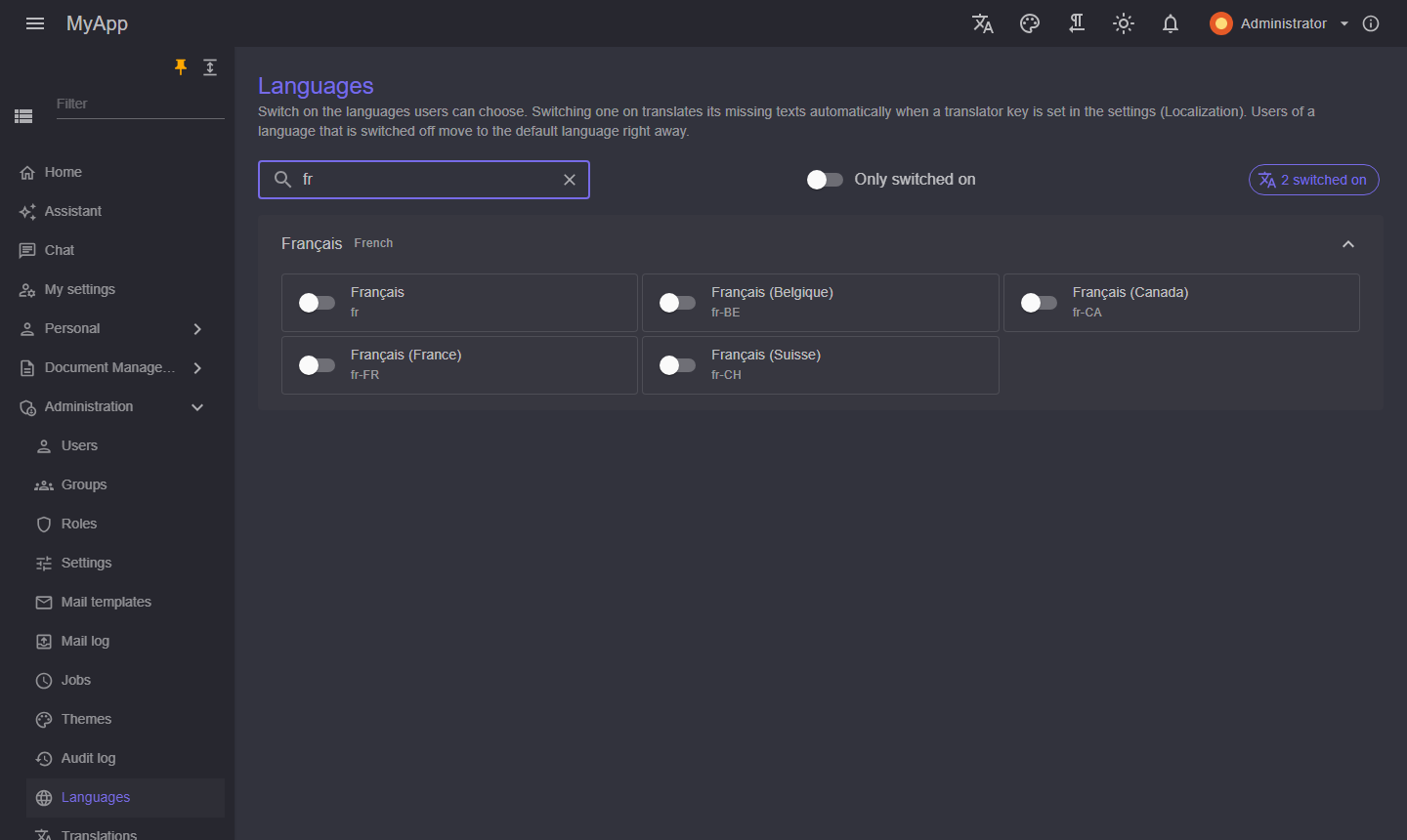
/admin/languages): every culture, grouped by language, with a switch. Switching one on translates the texts it lacks with the translation service of the settings; a button translates what is still missing later. The star marks the default language, which cannot be switched off.
 - Translations (
/admin/translations): every key with the module text and the edited text per language. Edits win over the module texts.
Both need Localization.Manage.
Every change reaches all clients at once (global:localization realtime topic): they reload their texts, and users whose language was switched off move to the default language with a short notice.
Machine translation
Texts a language lacks are machine translated: when an administrator switches the language on, with the button on the Languages page, and after every start for the switched on languages (a language from LocalizationOptions without shipped texts, or the new texts of an update). Translations are stored like edits, so the Translations page shows and corrects them; the shipped texts stay the source of truth. Placeholders like {0} are kept out of the translation, and a translation that lost one is dropped. A service that fails (a used up quota, a server that is down) ends the run with what it translated so far; the rest follows on the next start or with the button.
When an update ships a text that clients had reported as missing (for example a default text of a MudBlazor.Extensions component), the next start drops its stored machine translations in the languages that now ship it, so the shipped text shows; a translation an administrator edited on the Translations page stays.
| Service | Cost | Account | Where the texts go | Good to know |
|---|---|---|---|---|
libreTranslate |
free, open source (AGPL) | none | your own server or container | about 600 MB image plus about 100 MB per language; good quality for the big languages; default of new apps |
myMemory |
free | none, optional contact email | public service of Translated | 5,000 characters a day per address, 50,000 with an email; one text of up to 500 bytes per request. The library texts of one language are about 20,000 characters, so a whole language takes days: fine for a few new texts |
deepL |
free plan 500,000 characters a month | key | DeepL | keys ending in :fx use api-free.deepl.com; best quality for European languages |
azure |
free tier 2 million characters a month | key and region | Microsoft | over 100 languages |
google |
about 500,000 characters a month free | key | Cloud Translation Basic (v2) | |
ai |
per token of the model | the AI assistant configured | the model's provider | natural wording; uses the provider, model and key of the AI settings, also with the assistant switched off |
none |
missing texts show in English |
Unofficial endpoints, such as the free Google address that browser extensions and some headphone apps call (translate.googleapis.com with client=gtx), are left out on purpose: they come without terms of use for third parties, block or rate-limit without notice and can change any day.
Settings
The settings group Translation (global only, Localization.*):
| Setting | Meaning |
|---|---|
Localization.TranslationProvider |
One of the services above; default azure, which does nothing until a key is set |
Localization.TranslatorKey |
Key of DeepL, Azure or Google, the optional API key of a LibreTranslate server; a secret, masked in the form |
Localization.TranslatorRegion |
Region of the Azure translator resource |
Localization.TranslationEndpoint |
Address of the LibreTranslate server; for the others an optional replacement of the public address (a proxy) |
Localization.TranslationEmail |
Contact for MyMemory, raises the quota to 50,000 characters a day |
Localization.TranslationSource |
The language translations start from, default en |
Localization.AutoTranslate |
Translate when a language is switched on and after the start (default true); off, only the button translates |
Texts are keyed by their English wording, so English is the natural source. With TranslationSource set to de, a text starts from its German wording when there is one (shipped or edited) and from English otherwise; a language never translates from itself, so de-CH starts from English.
In the app host
UseLibreTranslate adds a LibreTranslate container that loads only the models of the given languages and the source language (LT_LOAD_ONLY, English is always there), keeps them in the volume coworkee-libretranslate-models that all apps on the machine share, and lets the services with the localization module wait until it answers /health. The first start downloads the models; later starts find them in the volume. It also seeds the settings TranslationProvider and TranslationEndpoint.
builder.AddCoworkeeApp("myapp", options => options.UseLibreTranslate(["en", "de", "fr", "es", "it"]));
A language switched on later that is not in the list is not loaded: add it and restart the app host. Another service is seeded with UseTranslation, its key from a parameter:
var key = builder.AddParameter("translation-key", secret: true);
builder.AddCoworkeeApp("myapp", options => options.UseTranslation("deepL", key));
Apps of coworkee new read Parameters:translation-key, translation-region and translation-email from the user secrets of the app host:
Outside the app host, set the settings on the Settings page or as defaults in the configuration (Coworkee:Settings:Defaults:Localization.TranslationProvider). A production LibreTranslate runs as any container (libretranslate/libretranslate); point TranslationEndpoint at it.
CLI and Studio
coworkee new --languages en,de,fr,es --translation-provider libreTranslate offers any of the common languages from the start; those without shipped texts are translated at the first start. --translation-source de starts from German. Studio has a Languages step with a searchable list of languages, the default and source language and the services side by side with what each costs and needs.