Identity and permissions
Sign-in runs on its own host, an OpenID Connect server built on OpenIddict. The web host acts as backend for frontend: it does the code flow with PKCE, keeps the tokens in a server-side session and hands the browser a cookie. The API checks bearer tokens. The browser never holds an access token.
A new installation either seeds its tenant, administrator and roles from the migration service (the template does that) or asks for them in a setup wizard on first start, which is how Sharemee comes up.
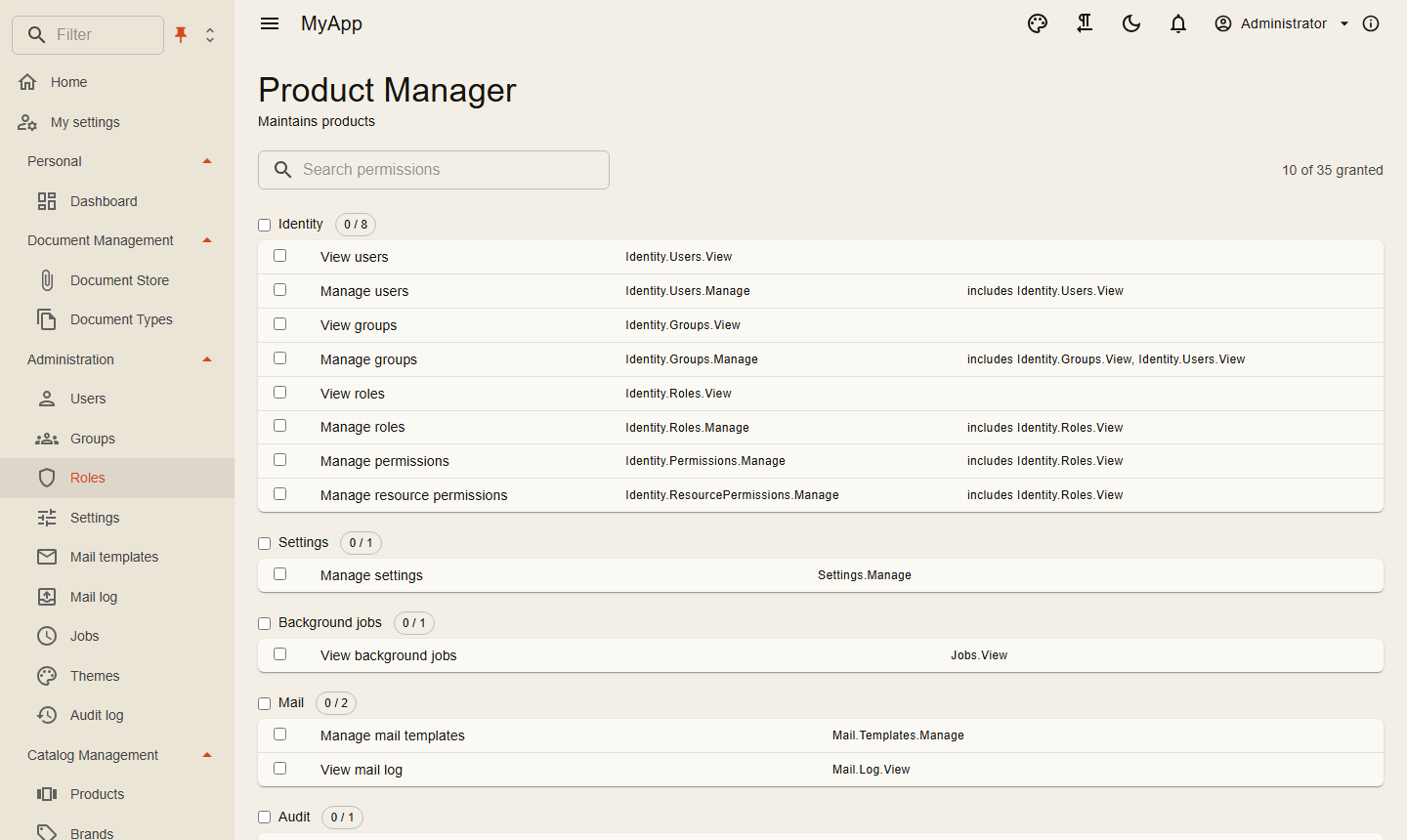
Who may do what
Permissions are strings that modules define. They are granted to roles, to groups or to one user, and the role editor shows them as a matrix with a toggle per group. A request declares what it needs with [RequiresPermission], and the dispatcher checks it before the handler runs.
Grants can also target a single resource, one folder for example, and inherit down a hierarchy you describe with IResourceHierarchy. Blazor pages hide buttons and menu entries the user can't use, but that is cosmetic. The server decides.
Administrators edit everything about a user on one page, from the email address to lockout and two-step verification reset. Sign out everywhere and Lock act at once: tokens carry a hash of the security stamp, the API compares it on every request, and with Redis the other instances hear about it immediately.
Log in as another user
Support staff see what a user sees without knowing the password: Log in as on the users list and on the user's page needs Identity.Users.Impersonate ("Sign in as other users", implies Users.View, not part of Users.Manage). The target is another active, unlocked user of the same organisation, and nobody impersonates while impersonating already. The target holds no permission the caller lacks: effective permissions of all roles on both sides, whatever role either has picked as active role. A permission on a single resource (ResourcePermission) counts unless the caller holds it globally or on the same resource. Every group the target is a direct member of must lie in the caller's groups or their subtrees, as IGroupScope computes them; Identity.Groups.ScopeAll waives that. A support user of one customer group therefore cannot sign in as a user of another, a member of a parent group can sign in as members of its sub-groups. The API checks this when it issues the ticket (POST /api/v1/identity/users/{id}/impersonation, ICoworkeeApi.StartImpersonationAsync), the auth server again when it redeems it and on every authorization and token refresh of the impersonation.
The ticket is valid for a minute and only for the signed-in user who asked for it. It travels in the query string (/bff/impersonate?ticket=... to the auth server page /Account/Impersonate), so request logs and the browser history may hold it; outside the impersonator's own sign-in it is worthless, and after a minute anyway. The auth server signs the browser in as the target and comes back through /bff/login, so the app session switches too. From then on every token has the target as sub plus impersonator (user id) and impersonator_name, the access token also impersonator_stamp (a hash of the impersonator's security stamp) and impersonation_started. ICurrentUser.ImpersonatorId reads it on the API, and the audit log records it next to the user (AuditEntry.ImpersonatorId, "impersonated by" on the audit page, GET /api/v1/audit?impersonatorId=...). Background jobs, outbox messages, integration events and Elsa workflows started by the user carry it along (JobEnvelope, OutboxMessage, IntegrationMessage, ImpersonatedUser(userId, tenantId, impersonatorId)), so their changes name the impersonator too. The app bar shows who signed in as the user; Back to my account in the user menu (/bff/stop-impersonation to /Account/StopImpersonation) revokes the refresh tokens of the impersonation and signs the impersonator in again, persistent if his own sign-in was. Start and stop are logged.
The impersonation ends at the next authorization or token refresh, with its tokens revoked and the browser signed out, when:
- the impersonator signs out everywhere, gets a new password, is locked or deactivated (his security stamp no longer matches
impersonator_stamp); Back to my account then signs the browser out instead of in; - the rules no longer hold: the impersonator lost
Identity.Users.Impersonate, the target got a permission, group or resource grant the impersonator lacks, or was locked; - it lasts longer than
Coworkee:Auth:MaxImpersonationDuration(AuthServerOptions.MaxImpersonationDuration, 8 hours by default).
The rules run again on every authorization and refresh: a few queries per refresh of an impersonating session, nothing for other sessions.
Only clients with AllowImpersonation (Coworkee:Auth:Clients:<n>:AllowImpersonation, default off) serve an impersonation, also on refresh; the others, such as Grafana, Kibana or AirWorks, answer access_denied. In the app host, AddWeb turns it on for the web client. An impersonator never consents for the user: a client with explicit consent that the user has not allowed himself answers consent_required, and the consent page answers 403.
While impersonating, the account pages of the auth server (password, two-step verification, passkeys, applications, the forced password change and the consent page) answer 403, signing out at the auth server (/Account/Logout, end session) revokes the impersonation's tokens, and requests marked [NotWhileImpersonating] are refused (auth.impersonating): changing the own e-mail address, creating API keys, exporting personal data, deleting the account, choosing the active role, and creating or changing webhooks and report subscriptions. The check also holds in jobs and handlers that act for the user. Mark own requests of that kind the same way. Access tokens issued during the impersonation stay valid until they expire (AccessTokenLifetime, 15 minutes by default), so at most that long after Back to my account, but the BFF no longer holds them. Impersonation stays within one organisation. Resource restrictions (IResourceRestriction) that take access away from the impersonator are not compared: as the user he sees what the user sees. Work dispatched with ISystemDispatcher runs as the system and does not name the impersonator.
Group tree and scope
Groups form a tree per tenant, so they can stand for organisation units: customers, subsidiaries, branches. A group has an optional parent and a Code, a path of 5-digit segments (00001.00003) that only the handlers maintain. Create a group under a parent, move it (PUT /api/v1/identity/groups/{id}/parent, the subtree moves along) or delete it, which removes its sub-groups too. Names are unique among siblings, the depth is limited to 16. Groups of an existing app become roots; the migrations host gives them their codes on the next run.
Users are members of any number of groups. Units grant nothing by themselves: a group only decides what a user sees. Groups can still carry roles as before (Roles tab), but a parent's role is not inherited by its sub-groups. Members are added, removed or moved all at once to another group with Identity.Groups.ManageMembers (implied by Identity.Groups.Manage). Identity.Groups.ScopeAll ("Work in any group") makes every group of the tenant accessible, for operators who belong to no unit; administrators with all permissions have it. The tree endpoints (/groups/children, /groups/tree) accept Groups.View or ScopeAll.
On the groups page the tree loads lazily, with a search, counts, and tabs for General, Members and Roles. ?group={id} deep-links to a group. Apps add their own tabs:
services.AddGroupDetailTab<OrganisationCodes>("Organisation codes", ShipmentPermissions.Shipments.View);
// the component has [Parameter] public Guid GroupId { get; set; }
Which groups a user sees
IGroupScope (namespace Coworkee.Application.Groups, no Identity reference needed) answers per request:
| Method | Result |
|---|---|
MembershipsAsync |
the groups the user belongs to directly |
AccessibleAsync |
memberships and all their sub-groups; every group of the tenant with ScopeAll |
SelectedAsync |
the user's selection, limited to what is accessible |
ActiveAsync |
the selection and its sub-groups; AccessibleAsync when nothing is selected |
NodesAsync, AncestorsAsync |
GroupNode(Id, ParentId, Code, Name) of groups or the path above one (root first) |
The picker in the app bar stores the selection per user on the server (cw.GroupSelections): nothing selected means everything the user may reach, some groups selected means those and their sub-groups. A selection never widens access, and a stale one (the user lost the membership) is ignored. It applies to interactive sign-ins only; personal API keys, MCP, service clients and background jobs see AccessibleAsync. Without a user every list is empty; bypasses (a "view all" permission) are the app's business.
Apps scope their rows with a filter written once against ActiveAsync:
using Coworkee.Application.Groups;
using Coworkee.OData;
using Microsoft.EntityFrameworkCore;

internal sealed class ShipmentFilter(IGroupScope scope) : IODataEntityFilter<Shipment>
{
    public async Task<IQueryable<Shipment>> ApplyAsync(IQueryable<Shipment> query, CancellationToken ct)
    {
        var ids = (await scope.ActiveAsync(ct)).ToList();
        return query.Where(s => EF.Parameter(ids).Contains(s.GroupId));
    }
}

// in the module
services.AddScoped<IODataEntityFilter<Shipment>, ShipmentFilter>();
EF.Parameter matters on SQL Server, which rejects more than 2100 parameters from a plain Contains.
The selection decides what lists show, not what a user may open. The library narrows collections, $count, facets, search, export, QueryData, client entities and reports by the selection. By-key reads, the guards of attachments and social features (VisibleIdsAsync, so tag link counts too), history, import matching, workflow visibility and webhooks run unnarrowed, so a link to a record of another unit still opens. Code of your own that means access, not listing, wraps in using (GroupScope.Unnarrowed()). Exports started in the UI capture the selection when requested and the job runs under GroupScope.Selection(ids); if every captured group is stale by then, the file falls back to everything accessible. The client-entity mirror follows the selection (IClientEntityPartitionPart), so changing it resyncs the browser copy.
Place <GroupScopePicker /> in your app bar yourself; the template layout does not include it, and it hides itself for users without accessible groups. Data tables reload when the selection changes (GroupScopeState), and IClientDataCache is the seam for your own client-side caches.
Group import (Groups.Manage) takes Name, Description and ParentPath ("Customer A/Hamburg") and is an upsert by path: a group of that name at that path gets its description updated, otherwise it is created. Missing parents are not created implicitly (an earlier row of the same file may create them); an unknown parent is an error row. A / in a name cannot be addressed by path, empty path segments are ignored, a blank description does not clear an existing one, and a dry run cannot flag unknown paths (a real run does). The groups page has Import and Export buttons; the Groups set has a computed ParentPath, and the export writes Name, Description and ParentPath in tree order, so an export imports again, for example into another tenant. The Users OData set exposes Groups for filters such as Groups/any(m: m/GroupId eq {id}).
Realtime and units as customers
[Realtime] still broadcasts type:X to everyone with the view permission. When units are customers in one tenant, clients of other units see the ids and changed property names of records they may not open (and reload). Per-group topics are a follow-up.
Workflow approvers, mail to a group, resource permissions and group roles use direct membership, not the tree.
Keycloak and other providers
Any OpenID Connect provider can sign users in; each one is a section under Coworkee:Auth:External:Providers. An external login joins an existing account only when the provider marks the email as verified (or is configured with TrustEmail). In development, options.UseKeycloak() in the Aspire app host starts Keycloak with a realm that has the same users and passwords as the app.
Whether people sign in with a password, a provider or both is the setting Auth.LoginMode, changeable at runtime. Self registration (off unless Account.AllowRegistration is set) can require activation by an administrator, a confirmed address, allowed address patterns and uploaded documents. Password rules are settings too, up to a history of 24 passwords, and every password field lists the rules in force.
Keys and personal data
Scripts and AI clients use personal API keys: cwk_ plus 64 hex characters, shown once, stored as a SHA-256 hash, valid for 7 to 365 days. A key never has more than its user has right now; take a role away from the user and the key loses it on the next request.
Modules that store data about a person implement IPersonalDataContributor. The Privacy tab of the account page then downloads everything as personal-data.json, or deletes the account.
Status: version 0.0.1.x, so names in this area can still change between releases; the changelog lists what to adapt.
Reference: authentication and Keycloak, permissions, registration and sign-in rules, clients, sessions and password rules, sign-in pages, API keys, privacy.